Google Cloud Developer Plugin Brings Live Docs and Safety Controls to Antigravity
Antigravity’s new google-cloud-developer plugin addresses a practical weakness in cloud coding agents: stale knowledge can lead to outdated SDK calls, invalid gcloud flags, or commands that exceed an account’s permissions. Cloud platforms change, and an agent answering from training alone may repeat a pattern that no longer matches current documentation. The plugin pairs live Google documentation with safeguards around command execution and changes to cloud resources.
That combination matters because cloud development mixes ordinary coding with operations that can alter access, activate services, or incur costs. A plausible command isn’t necessarily a safe command. The plugin’s stated design aims to put reference material and operational checks in the same workflow, though the quality of the result still depends on how the agent interprets a task and follows those instructions.
Documentation and guardrails in one package
The plugin combines baseline skills with a routing system that can load more specialized guidance when a task calls for it. Its documentation server supplies answers and code samples from official Google sources covering Google Cloud, Firebase, Android, web development, and Gemini. That breadth makes the package relevant to more than infrastructure work, but it also means developers should pay attention to whether a response is grounded in the right product’s documentation.
Its command and setup guidance adds practical checks. The agent can inspect the local environment and existing CLI configuration, plan a safe execution path, validate gcloud syntax, and block accidental destructive operations. It follows least-privilege IAM patterns and asks for consent before enabling billable APIs or modifying cloud infrastructure. These are useful boundaries: a command can be syntactically valid yet still be inappropriate for the account or project in which it runs.
Skills included at installation
finding-google-skillsdiscovers and loads task-specific instructions from thegoogle/skillsrepository on GitHub, so users don’t have to find and install each skill by hand. The routing approach can reduce setup work when a task reaches beyond the plugin’s baseline guidance.retrieving-developer-knowledgegrounds responses and code samples in official Google documentation. For developers, the practical benefit is a path to check current product guidance during a task rather than treating a model’s memory as the final authority.gcloudchecks Google Cloud CLI commands and applies safeguards before execution. That matters most when a command can change project state or permissions, where a small syntax or targeting error can have consequences beyond a failed build.google-cloud-recipe-authguides agents toward service identities and Application Default Credentials, while blocking risky practices such as downloading service account JSON keys. The guidance steers routine authentication toward established credential patterns and away from creating portable key files.google-cloud-recipe-onboardingguides project setup, account onboarding, and billing checks, auditing project state before attempting to activate services. That order is sensible: checking what’s already configured can prevent an agent from treating every missing service as a reason to make a change.
Specialized guidance loads when needed
The plugin’s google-cloud-discovery.md routing rule works with finding-google-skills to fetch relevant skills from Google’s public catalog when a prompt touches a specialized subject. That keeps niche instructions out of the agent’s context until they’re useful, while leaving room to expand its capabilities on demand. In practice, this is a way to keep a general assistant from carrying every specialist workflow in every conversation.
There’s a tradeoff. A routed skill is useful only if the system recognizes the subject and retrieves the right guidance; developers still need to review consequential actions and question answers that don’t fit their project. The plugin describes safeguards, but those safeguards don’t remove the need to understand what a proposed command will do.
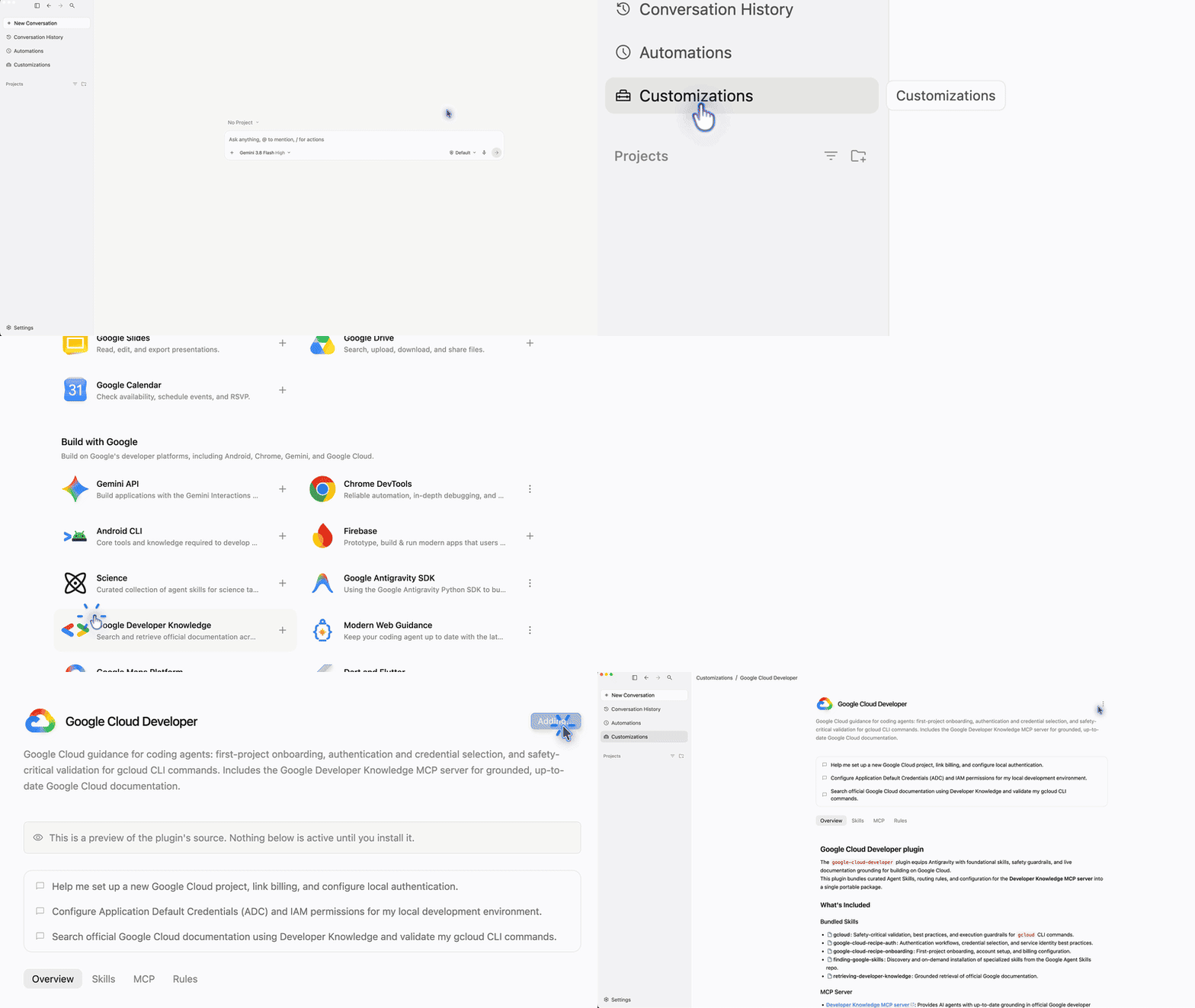
Users can install the plugin from the Antigravity Marketplace or run this command in a terminal:
agy plugin install google-cloud-developerThe CLI registers the skills and connects the Developer Knowledge MCP server. The plugin and its skills are also available to explore on GitHub. For marketplace installation details, see the Antigravity documentation.
Answers grounded in current documentation
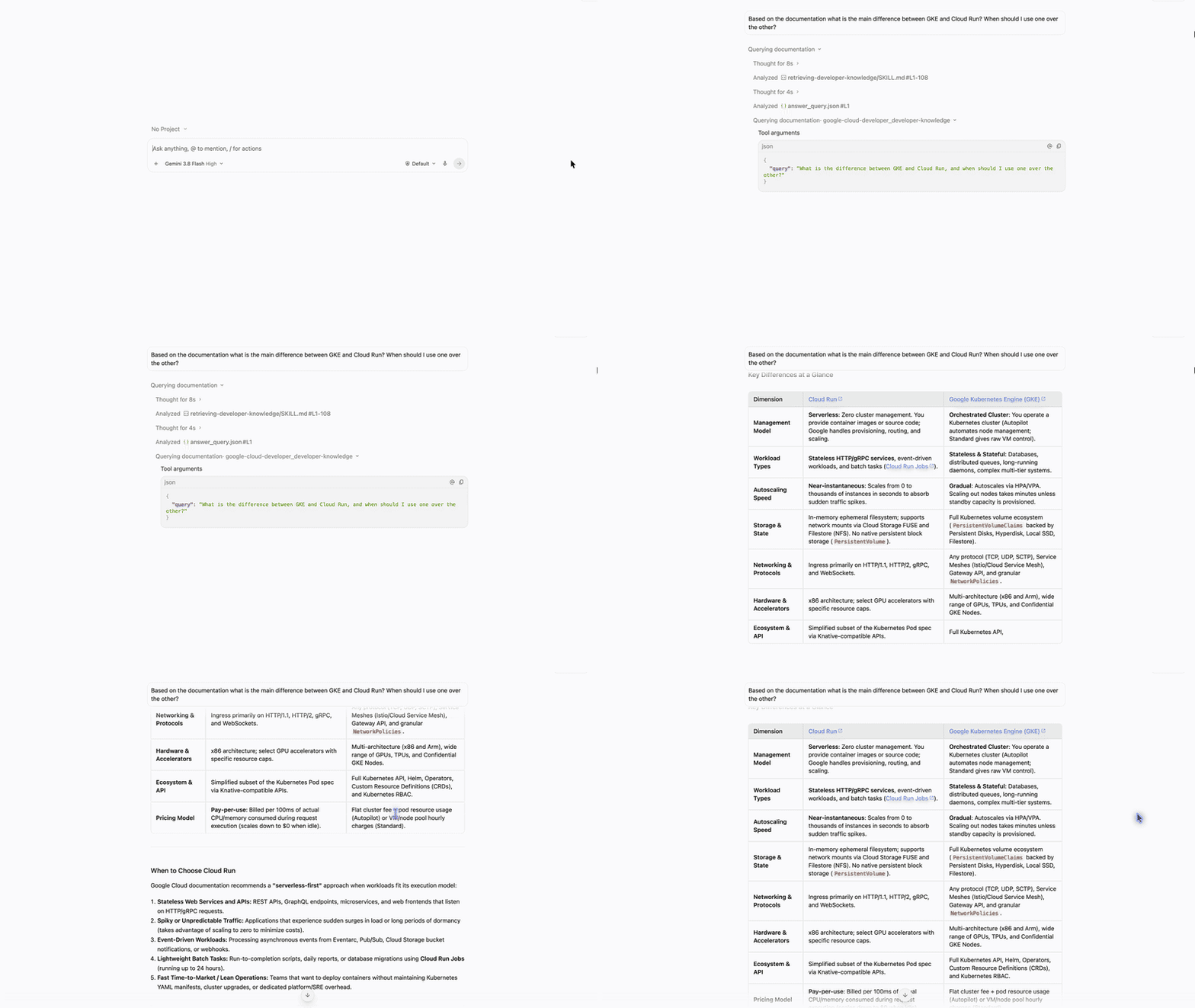
With the plugin active, agents can query Google’s documentation without a special prompt format. For example, a user could ask: “Based on the documentation what is the main difference between GKE and Cloud Run? When should I use one over the other?” The example shows the intended workflow: ask a product question in ordinary language and let the agent consult documentation while responding.
The agent sends the query to the pre-authorized MCP server and uses its documentation to form a verified response. That gives developers a direct way to check service guidance while working, rather than relying only on what a model learned during training. “Verified” here describes the use of documentation as a source; readers should still assess whether the answer addresses their workload, constraints, and deployment needs.
What the plugin changes for cloud teams
For cloud teams using coding agents, the practical value is the combination of current reference material and checks around commands that can affect projects, permissions, or spend. The plugin makes those controls part of the agent’s working context from the start. This is more significant than it looks: developers often move between asking for an explanation and asking an agent to take action, and the risks change sharply at that boundary.
If you’re working in this space, the useful question is whether the agent’s documentation and safeguards fit your team’s actual workflow. A plugin can make current guidance easier to reach and risky operations easier to catch, but it can’t decide whether a proposed change is appropriate for a particular service or project. The controls provide a starting point. Human review still matters.
And the access setup is deliberately simple: the connection is pre-authorized, so installation doesn’t require users to manage API keys, exchange OAuth tokens, or edit configuration files. That lowers friction, though convenience alone doesn’t establish how well a system handles every edge case. The value will depend on whether developers find the retrieved guidance relevant and whether the execution checks behave predictably in real work. The test is practical, not promotional.


