Google Health Guardian Brings Blood Pressure and Insulin Trends to Fitbit Air
Google is extending Health Guardian to Fitbit Air, bringing blood pressure trend reports and insulin resistance estimates to more users through the Google Health app. The features offer a new way to look at wearable data over time, but they don’t measure either condition directly. That distinction matters: the reports may prompt useful questions, yet they aren’t a substitute for clinical tests or medical advice.
The Fitbit Air update arrives in Google Health version 5.11 for Android and iOS. Google first introduced Health Guardian on Pixel Watch 3, 4, and 5 in late September, with access included for those devices. Fitbit Air users need a Google Health Premium subscription, priced at $9.99 a month. Older Fitbit models don’t appear to be included. Google hasn’t clarified what access looks like for people who own both a Pixel Watch and a Fitbit Air.
What the reports can—and can’t—tell you
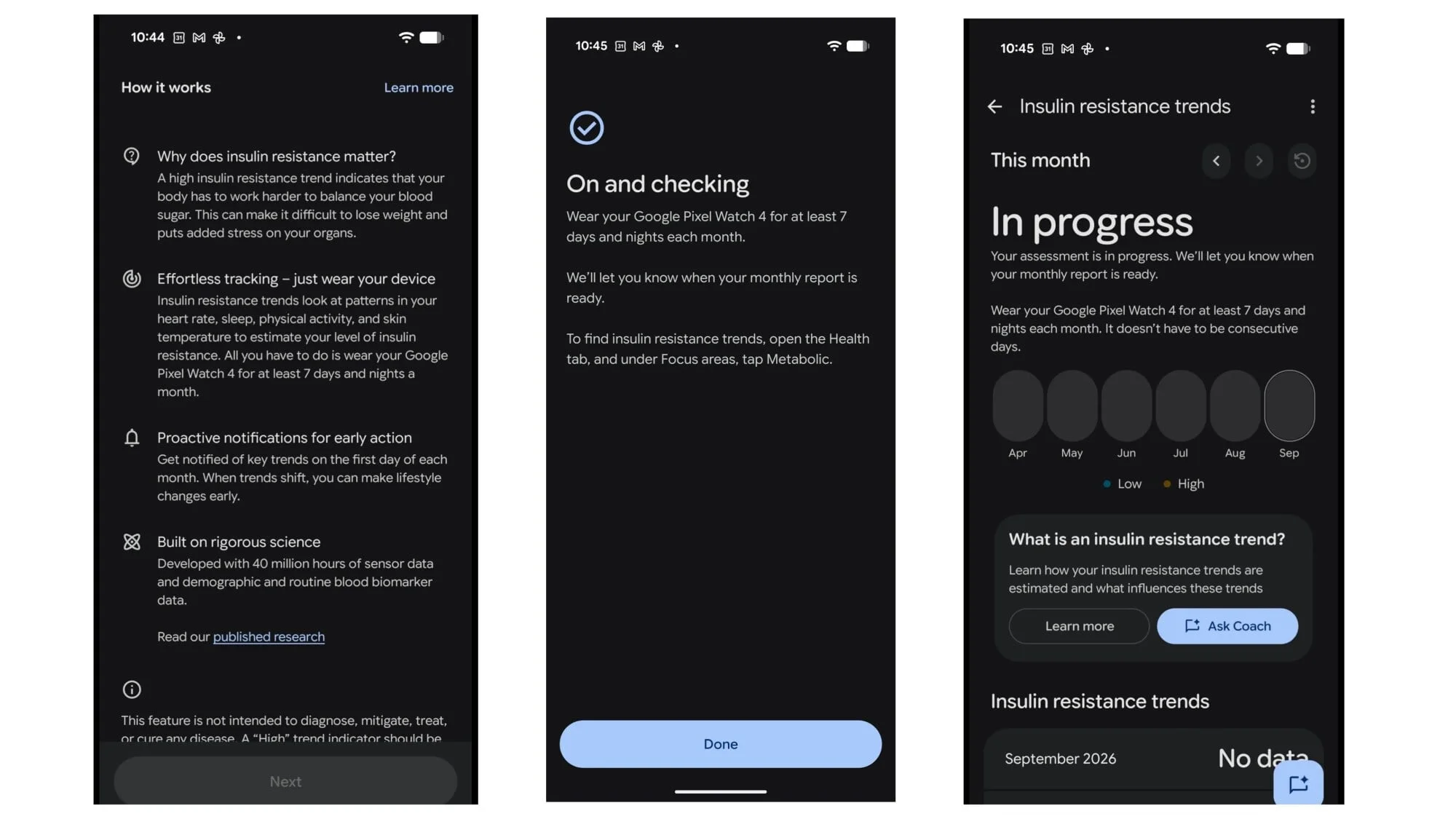
Insulin resistance is linked to type 2 diabetes and can be associated with an increased risk of prediabetes. It involves the body’s cells responding less effectively to insulin, which can contribute to higher blood glucose. Clinicians typically assess it using blood tests. One common measure, HOMA-IR, combines fasting glucose and fasting insulin values into a score.
Health Guardian’s insulin resistance feature uses wearable data instead. Google’s published research describes a study in which participants used their own Fitbits or Pixel Watches to record measures including heart rate, heart rate variability and activity. The paper doesn’t spell out the algorithm in enough detail to show exactly how those signals produce an estimate, or establish how useful the feature will be across the general population.
Google says the feature is “not intended for medical purposes” and “not a pre-screener for diabetes.” That framing should guide how people use it. A trend estimate from a watch isn’t a diagnosis, and a concerning result calls for a conversation with a healthcare professional and whatever testing they recommend. Likewise, a reassuring score shouldn’t be used to dismiss symptoms or stop a treatment plan.
Blood pressure is also an estimate
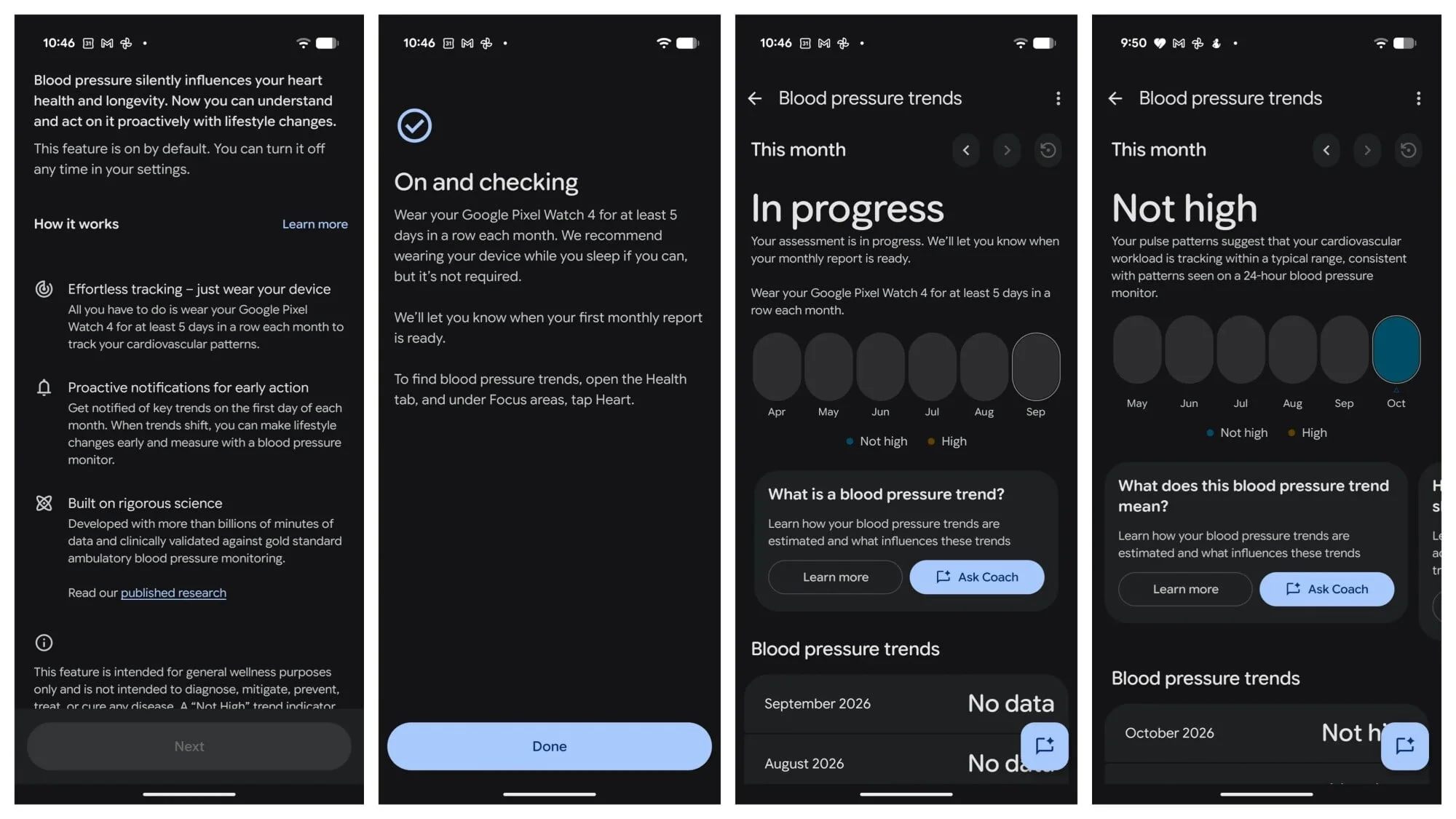
Google has also released a paper describing its blood pressure algorithm. The paper is hosted on medRxiv and hasn’t been peer-reviewed. It discusses researchers’ effort to understand what an AI-based model might be using to generate its estimates. The reported performance was comparable to clinical blood pressure measurements in the study, but that result doesn’t settle how well the feature will work in everyday use.
One notable limitation is the study’s participant pool: people with heart disease were excluded, even though they may have particular interest in tracking blood pressure. A wearable estimate could be a convenient signal to follow, but it doesn’t provide a direct blood pressure measurement. Google Health’s monthly report should therefore be treated as a prompt to seek appropriate follow-up when needed, not as a clinical reading.
Setting up tracking and qualifying for a report
Pixel Watch users received Health Guardian in Google Health app version 5.09 for Android. Fitbit Air support is in version 5.11, available on Android and iOS. After updating, insulin resistance tracking can be enabled from the app’s Health tab under Metabolic; blood pressure tracking is under Heart. Sleep-breathing quality is available under Respiratory.
Google plans to issue monthly reports on the first day of the month, provided the watch has collected enough data during the previous month. For blood pressure trends, the watch must be worn for five consecutive days in that month; overnight wear isn’t required. For the insulin resistance estimate, it must be worn for seven days and nights, though those days don’t need to be consecutive.
That schedule affects when new Fitbit Air users will see results. Pixel Watch reports were due to begin October 1 for users who had already met the data requirements. Fitbit Air users setting up tracking with the new update should expect their first report on November 1, assuming they collect the required data in October.
Reading the result without overreading it
An early Pixel Watch result described blood pressure as “Not High.” The user hadn’t collected enough data to receive an insulin resistance estimate. That blood pressure result happened to align with the user’s usual readings at medical appointments, but a match in one case can’t confirm the accuracy of the underlying estimate.
Reports shared by Pixel Watch users online show why the distinction between an estimate and a medical measurement matters. One user said the watch flagged high blood pressure and an insulin problem despite normal recent medical readings and bloodwork. Another described receiving a high insulin result after changing their diet, going to the gym regularly and losing about 40 pounds over the year. Those accounts don’t establish whether the readings were right or wrong; they show how easily a result can be confusing without clear clinical context.
For Fitbit Air owners, Health Guardian adds a longer-term health signal to the app, with a subscription cost and specific wear-time requirements. Its practical value will depend on how well the estimates hold up for a broad range of users and whether the reports help people have better informed conversations with clinicians. Until that’s clearer, the sensible takeaway is to use the trends as context—not as a diagnosis, a reason to delay care or a basis for changing treatment.


