Best Arc Browser Alternatives: Zen and Vivaldi Offer Different Paths
Arc’s planned shutdown before the end of 2026 leaves users with a practical choice: keep Arc’s workspace-led browsing style, or move to a browser that prioritizes compatibility and customization. The Browser Company has shifted its attention to Dia, which shares Arc’s framework but doesn’t retain many of the interface features that made Arc distinctive. That puts Arc users in the position of choosing which parts of their current setup matter most: the way tabs are organized, how extensions behave, or the convenience of staying with the same developer.
For people who rely on Arc’s vertical tabs, workspaces, and pinned pages, Zen is the closest fit. Vivaldi offers a different route, with Chromium compatibility and a broad set of built-in tools. Neither choice reproduces Arc exactly, so a switch will involve some adjustment. Before switching, export your Arc data so your browser setup can make the move with you. Bookmarks and other saved information can travel, but the browser’s underlying habits and layout may take more work to recreate.
Zen keeps Arc’s workspace-first feel

Zen is the most direct option for Arc users who want to keep browsing organized around a vertical sidebar. It supports customizable workspaces, pinned tabs, and interface mods, including community-made designs. Those features address the basic appeal of Arc’s layout: keeping separate tasks and collections of tabs easier to scan than a long row across the top of the window. Zen’s approach should feel familiar to users who think of tabs as parts of distinct projects.
It’s free, open source, built on Firefox, and includes no AI features or paid extras. That combination makes Zen an appealing choice for people who valued Arc’s interface but want a privacy-focused browser. Firefox extensions work in Zen, including the full version of uBlock Origin, which remains a notable advantage for users who rely on its broader blocking capabilities. For someone whose browser depends on a particular extension, that support can matter more than a close visual match.
The trade-off is Gecko compatibility. Most sites work, but some are tuned more closely to Chromium, so occasional issues may send users back to Chrome. This is the familiar compromise of choosing a browser engine with a smaller footprint in some parts of the web: compatibility problems may be infrequent, but they can disrupt a workflow when they do arise. If you're working in this space, it’s worth checking the sites and extensions you depend on before moving your daily browsing over.
Zen can also consume substantial memory when many tabs stay open. Closing older tabs and keeping workspaces tidy can help keep that under control, though those steps ask users to manage the browser actively. More organization. More upkeep.
Vivaldi favors choice and Chromium compatibility
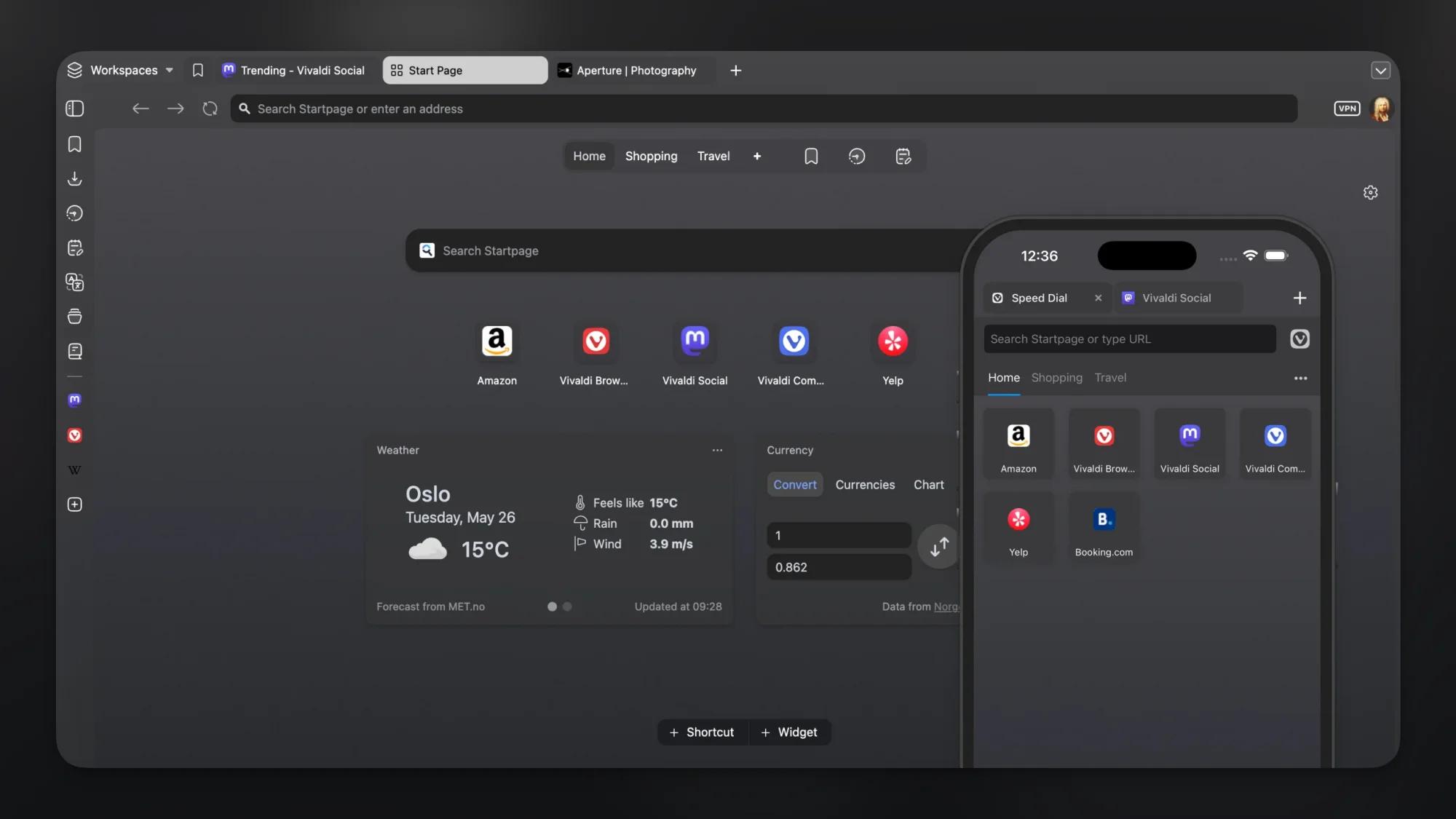
Vivaldi suits users who want the familiar reach of Chromium and more control over the browser around it. Its engine supports the sites and extensions Chrome users already know, while its settings let users shape a much more personalized workspace. That makes it a practical option for people whose first concern is whether familiar sites and tools will keep working, even if the interface takes time to configure.
Vivaldi bundles an ad blocker and limited free access to ProtonVPN. Its sidebar can host a reader, email accounts, notes, a calendar, or Web Panels for websites such as messaging and media services. Tabs can be arranged in workspaces, grouped into Tab Stacks, or displayed side by side. The result is a browser that can bring several browsing tasks into one window, though its many controls may feel like extra work to someone who wants a ready-made setup.
There’s one adjustment for Arc users: Vivaldi doesn’t include a vertical tab sidebar by default, though a mod can add one. That means the closest version of Arc’s tab layout takes an extra step, and users who install a mod should consider whether they’re comfortable maintaining a customized setup. Vivaldi’s appeal is its range of controls; it’s a strong match for people willing to tune their browser to fit their own habits. Here’s the thing: flexibility is useful only if you want to spend time making choices.
Other browsers worth a look
Arc’s interface and workspace model aren’t the only reasons someone might be looking for another browser. Some users may care more about privacy defaults, a lighter feature set, or staying within a particular device ecosystem. These alternatives make different trade-offs, so their presence on the list doesn’t mean they’ll recreate Arc’s daily workflow.
Brave: A simpler option for users who want privacy and speed with little setup. Brave blocks many pop-ups and trackers, supports Chrome extensions, and lets users disable its AI features. That combination may suit someone who wants familiar extension support without spending much time arranging tabs and panels.
Helium: A stripped-down Chromium browser without Google tracking or added features such as ads and pop-ups. Its restrained approach may appeal to users who want fewer built-in distractions, though it doesn’t offer the same workspace-focused feature set described for Zen or Vivaldi.
Dia: Built by Arc’s creators, Dia includes AI features and isn’t a direct substitute for Arc’s interface. It now offers a vertical sidebar and pinned apps, which may help users who want to stay with the same team. That overlap is limited, though: users choosing Dia should be comfortable with the product’s AI features and its different approach to Arc’s interface.
Quiche: iPhone and iPad users can try this independent browser, which offers a customizable layout and a carefully designed interface. It’s a strong alternative to Safari. Its relevance depends on where you browse: it’s an option for Apple’s mobile devices, not a direct answer to replacing Arc on a desktop.
Choose the workflow you want to keep
Zen is the clearest fit for Arc’s sidebar and workspace habits; Vivaldi is better suited to users who want Chromium compatibility and room to reshape their browser. The numbers here are underwhelming in one respect: no option described here preserves every part of Arc’s experience. Users will have to decide which conveniences they can give up and which ones they’re willing to rebuild.
What this means for you is that the best choice depends on your actual browsing routine, not just a list of features. If Arc’s organization is what you value, Zen gives you the closest starting point, with Gecko compatibility and memory use to consider. If familiar Chromium support and built-in tools matter more, Vivaldi gives you more room to configure the interface. And yet, switching browsers is also a chance to question which parts of an old setup have become habits rather than necessities.


