Python Context Managers: Reliable Cleanup for Resources and Temporary Settings
Context Managers Beyond Opening Files in Python
By Nahla Davies · October 27, 2026 · Practical Python
Python’s with statement is best understood as a guarantee about cleanup. That matters far beyond closing files: any temporary change to a program’s environment can leave a mess when an exception skips the cleanup code. For anyone writing evaluation scripts or other multi-step jobs, that’s the practical case for learning context managers properly.
This article covers how __enter__() and __exit__() work, including how __exit__() can affect exception handling; ways to create managers with a class or the @contextmanager decorator; and standard library tools such as TemporaryDirectory, patch.dict(), and ExitStack. It also looks at when a changing number of resources calls for wrapping an ExitStack in a class.
Consider an evaluation script that creates a scratch directory for extracted test data, redirects a model cache to a faster disk, lowers the transformers logger to WARNING, and starts a timer. It’s supposed to remove the directory, restore the environment and logger settings, and print the elapsed time when evaluation ends.
But evaluate() can fail on a malformed record. If it does, execution never reaches the cleanup at the bottom: the cache path can linger, the logger stays quiet, and 3 GB of extracted files remain behind. The numbers here are less important than the failure pattern. Cleanup that runs only on success isn’t reliable cleanup.
scratch = Path("scratch"); scratch.mkdir(exist_ok=True)
os.environ["MODEL_CACHE"] = "/fast/cache"
logging.getLogger("transformers").setLevel(logging.WARNING)

start = time.perf_counter()

scores = evaluate(model, extract(archive, scratch))   # raises on a bad record
print(f"took {time.perf_counter() - start:.1f}s")     # none of this runs

shutil.rmtree(scratch)
del os.environ["MODEL_CACHE"]
logging.getLogger("transformers").setLevel(logging.INFO)
Many developers first encounter context managers through with open(path) as f and file closure. The more useful idea is that with marks a block whose exit triggers cleanup—even when the block raises an exception or returns early. A timer, temporary directory, reversible settings change, or group of resources can all fit that pattern.
The with statement sets a boundary
The Python language reference describes the sequence: Python evaluates the manager expression, calls __enter__(), binds its return value to the name after as, runs the block, then calls __exit__(). That final call happens on ordinary completion, an exception, or a return from inside the block. The promise is simple: the exit method gets its chance to run.
Two return values are easy to confuse. The value from __enter__() is what the as variable receives; it need not be the manager itself. open() gives you a file object, while TemporaryDirectory() gives you a path string. Meanwhile, __exit__() receives exception details when the block fails, or three None values when it doesn’t.
Its own return value controls whether an exception continues upward. A truthy value suppresses the exception; False or the default None lets it propagate after cleanup. The Python data model documentation spells out that behavior. It’s a small detail with real consequences: a manager that suppresses errors changes the caller’s control flow.
class Announce:
    def __enter__(self):
        print("enter")
        return "the value bound after as"

    def __exit__(self, exc_type, exc_value, traceback):
        print("exit", exc_type)        # None on a clean exit
        return False                   # let any exception propagate

with Announce() as x:
    print(x)
Exception Handling Is the Contract
A context manager’s cleanup runs when its block ends, but __exit__() also decides whether an error escapes. Return True, and Python treats an exception from the block as handled. That can hide a failed operation and leave you with missing results and no traceback. Even returning a cleanup function’s truthy result by accident can suppress the original error. For most managers, returning False makes the intent plain: clean up, then let the caller see what failed.
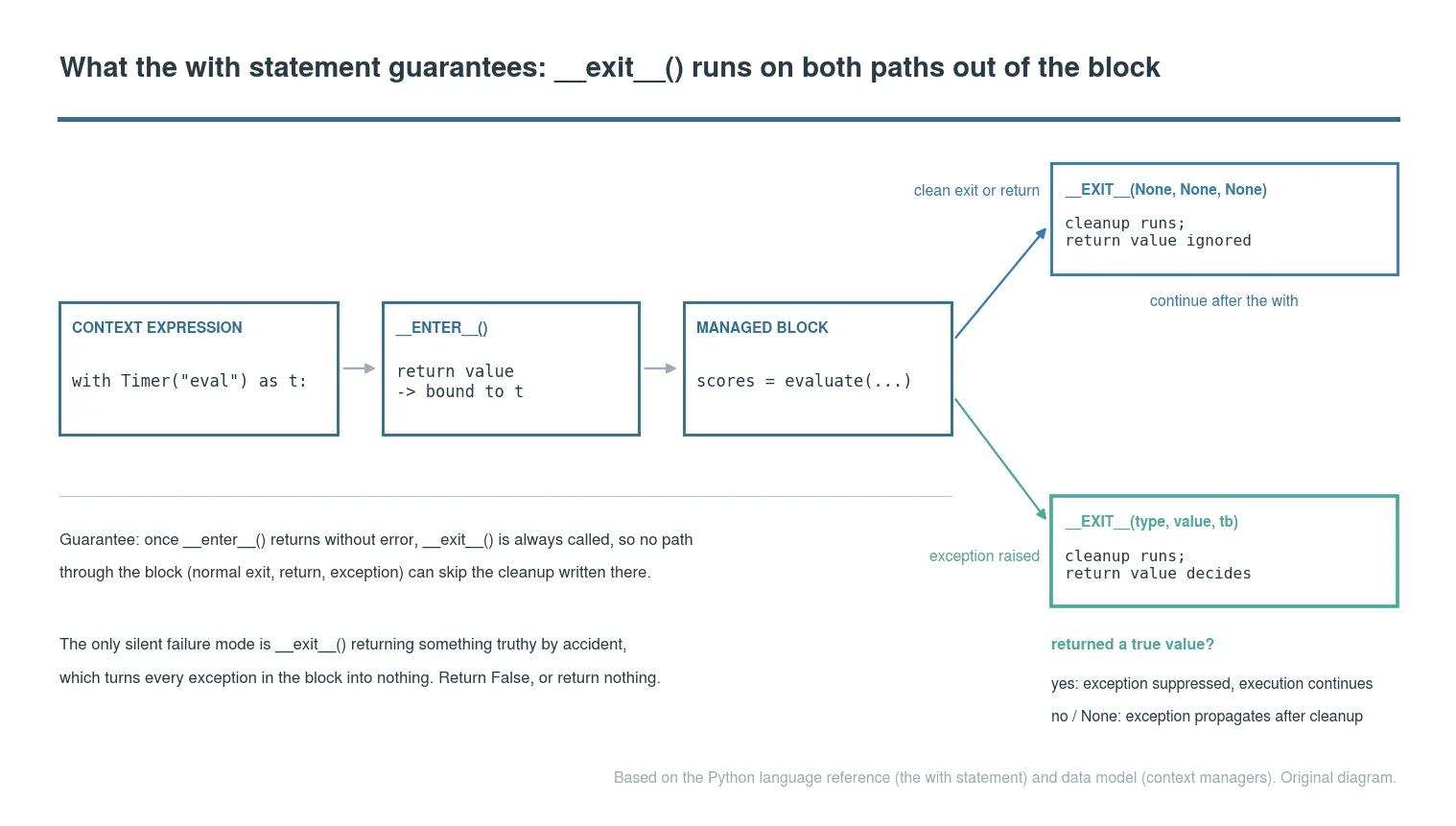
Both normal completion and exceptions pass through __exit__(). When an exception occurs, that method’s return value determines whether it reaches the caller. Credit: original diagram based on the Python language reference for the with statement and the data model.
Build a Timer That Cannot Forget to Stop
The timer pattern makes the practical value of a context manager easy to see. A manual stopwatch takes one time.perf_counter() reading before the work and another afterward; if the work raises an exception, that second call never happens. Put the stop reading in __exit__(), and elapsed time gets recorded on either route out of the block.
That’s more significant than it looks: the timer can report a failed operation without taking responsibility for hiding its exception. Here, __enter__() starts the clock and returns the timer itself, so the block can bind it as t. On exit, the manager stores the duration, prints the label, elapsed seconds to three decimal places, and an ok or failed status. It returns False, preserving any exception for the caller. The recorded value remains available afterward as t.elapsed.
import time

class Timer:
    def __init__(self, label):
        self.label = label
        self.elapsed = None

    def __enter__(self):
        self._start = time.perf_counter()
        return self

    def __exit__(self, exc_type, exc_value, traceback):
        self.elapsed = time.perf_counter() - self._start
        status = "failed" if exc_type else "ok"
        print(f"{self.label}: {self.elapsed:.3f}s ({status})")
        return False                   # never swallow the block's exception

with Timer("feature extraction") as t:
    features = extract(batch)

print(t.elapsed)                       # still readable after the block
The timer’s useful feature is what it does when work fails: it reports elapsed time while letting the original exception continue to its traceback. Its __enter__() returns the timer, so you can inspect t.elapsed after the block. In __exit__(), exc_type determines whether the printed label is ok or failed; the exception itself isn’t retained. If feature extraction stops after 12.418 seconds, the output can still tell you how long it ran before the failure. That helps distinguish a slow or stalled batch transform from one that crashed quickly.
For short intervals, perf_counter() is the appropriate clock: it offers the highest available resolution, and on CPython it doesn’t run backward. Its absolute reading has no useful meaning; only the difference between calls matters, which the timer handles internally. Keep the tool’s limits in view. It measures one block’s wall-clock time in one process and prints a line. That’s handy for spotting which preprocessing stage accounts for a twenty-minute job, but a Timer result isn’t a benchmark. If you’re comparing runs across machines, use timeit or a profiler instead of treating extra decimal places as evidence.
Use @contextmanager for Setup and Cleanup
A class makes sense when callers need to read state back, as they do with the timer. For a temporary change that should be undone after a block, @contextmanager is a more direct fit. The decorated function is a generator: code before yield runs when the block starts, and code after it runs when the block exits. That gives setup and cleanup the same context manager guarantees without spelling out a class.
import logging
from contextlib import contextmanager

@contextmanager
def quiet(logger_name, level=logging.WARNING):
    logger = logging.getLogger(logger_name)
    previous = logger.level
    logger.setLevel(level)
    try:
        yield logger
    finally:
        logger.setLevel(previous)

with quiet("transformers"):
    scores = evaluate(model, eval_set)
Here, quiet saves the logger’s current level, applies the requested level for the evaluation block, then restores the saved value in finally—even if evaluation raises an exception. That’s the practical payoff: temporary changes stay temporary, and the surrounding program keeps its original logging behavior.


