Query Databricks Iceberg Tables in BigQuery Without Copying Data
BigQuery can query Databricks-managed Apache Iceberg tables without first copying their data into a separate warehouse. For teams that run Spark engineering workloads in Databricks and concurrent analytics in BigQuery, Google Cloud’s borderless Lakehouse offers a way to use both engines against the same files. The practical value is less pipeline work and fewer duplicate datasets; the trade-off is that teams still need to manage metadata freshness, cloud access and table maintenance.
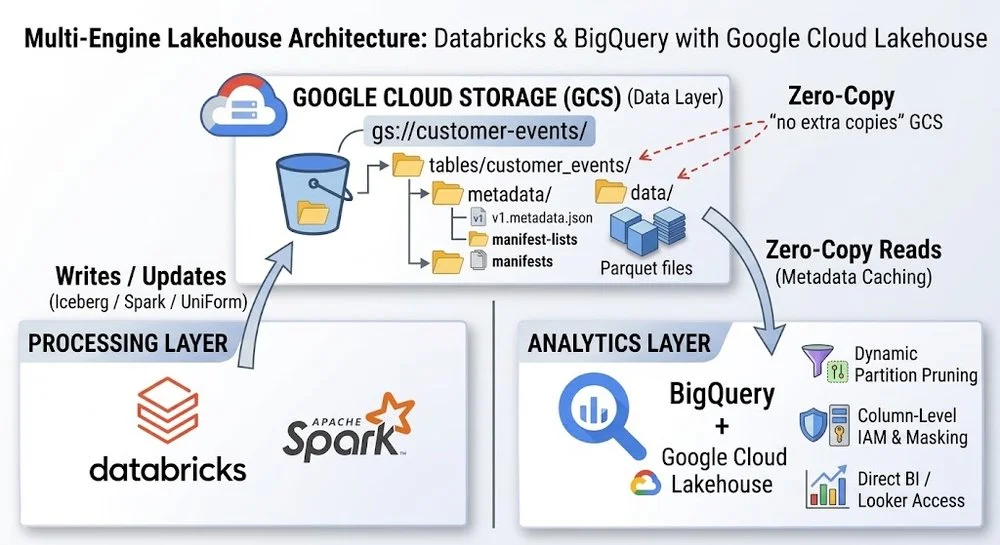
With this setup, Databricks writes data files to cloud storage and Lakehouse reads the Iceberg metadata needed to query them. Changes become visible in BigQuery after the next scheduled metadata refresh, which can run as often as every five minutes. That interval matters: “zero-copy” removes the need to replicate table data, but it doesn’t mean every update is instantly visible across platforms.
One set of files, two query engines
In the Google Cloud example, Databricks stores Parquet files in Google Cloud Storage (GCS). Managed Iceberg tables generate Iceberg-compatible metadata alongside their native Delta logs, giving Lakehouse the information it needs to locate and interpret the files. BigQuery can then apply its vectorized query engine to data in place instead of loading another copy into BigQuery storage.
The same model can extend beyond GCS. Lakehouse supports federation to external environments such as Amazon S3 and Azure Blob Storage through the Apache Iceberg REST Catalog and cross-cloud connections. Administrators choose a Google Cloud location for each federated catalog, with a location near the source data a sensible choice. BigQuery can query Parquet files where they reside, though reading across cloud boundaries can incur egress charges. Cross-Cloud Interconnect for AWS and Lakehouse caching can help reduce that cost.
Lakehouse also supports read and write interoperability across engines on its Iceberg foundation. That gives teams a path to run multi-statement SQL in BigQuery while working with tables managed through Databricks. The architecture is useful when engineering and analytics teams have different workload needs but should share a current dataset.
Catalog federation handles table discovery and access
Earlier integrations could require administrators to point BigQuery at static metadata paths. With the Iceberg REST Catalog API, Databricks Unity Catalog can serve as the central metadata layer. A BigQuery administrator creates a Lakehouse runtime catalog with a federated connection; when a query runs, Lakehouse asks Unity Catalog for the table’s current state.
Access to GCS is handled through credential vending. Unity Catalog issues short-lived tokens that give BigQuery temporary read access to the required data. This avoids relying on long-lived credentials embedded in query configuration and ties the data path to the catalog connection.
Administrators can also use delegated access to apply BigQuery controls to external Iceberg tables. A BigQuery Cloud Resource Connection can use a service account with the relevant GCS IAM permissions. Users granted access to the Lakehouse table entity can then be governed with BigQuery row-level and column-level security, as well as dynamic data masking, while Databricks continues to handle ingestion.
Metadata helps BigQuery skip unnecessary files
BigQuery consults Iceberg metadata when planning a query, then reads the files that can contain matching rows. Iceberg manifests hold information that helps the engine rule out irrelevant data. A conventional WHERE clause can therefore reduce the files and byte ranges scanned, lowering query runtime and on-demand slot use.
Filters are most useful for pruning when they compare partition columns with literal values. Iceberg’s hidden partitioning lets users filter on logical fields such as timestamps without having to know how those values map to directory paths. There is a specific limitation for Databricks-managed Iceberg tables: they don’t support partition transforms, and Databricks recommends liquid clustering instead.
For Iceberg tables, BigQuery reads manifest files as part of planning, so a separate metadata cache doesn’t need to be enabled. Cross-cloud data is a different concern. Lakehouse caching, currently in Preview, can retain retrieved data blocks in Google Cloud so repeat queries against sources such as S3 can read those blocks locally. The cache can help with repeated access, while manifest-based pruning limits the data fetched in the first place.
File layout still affects query speed
Zero-copy access doesn’t remove the need to maintain the underlying tables. Frequent writes, streaming ingestion and continuous updates can leave a table with thousands of small Parquet files. BigQuery must open connections to storage and inspect file metadata; doing that across a fragmented layout can consume time and reduce the benefit of vectorized execution.
Compaction combines small files into larger ones. Databricks can manage file layout with Liquid Clustering or table maintenance tools, and teams can run OPTIMIZE directly. The source guidance describes resulting files typically in the 256MB to 512MB range as helpful for BigQuery scan throughput. For Iceberg tables managed outside Databricks, the Iceberg procedure shown below uses bin packing and sets a 256MB target file size with a 64MB minimum.
-- Run on Databricks to compact small files
-- On Databricks:
OPTIMIZE customer_events;

-- For Iceberg tables you manage outside Databricks:
CALL my_catalog.system.rewrite_data_files(
  table => 'default.customer_events',
  strategy => 'binpack',
  options => map(
    'target-file-size-bytes',
    '268435456',
    'min-file-size-bytes',
    '67108864'
  )
);
Bin packing prioritizes balancing file sizes. Other sorting strategies can organize data around selected columns. The right choice depends on the table’s access patterns, so compaction should be treated as ongoing storage management rather than a one-time setup step.
VACUUM manages storage and snapshot history
Updates and compaction create new Iceberg snapshots. Files no longer referenced by active table states can remain in storage, where they may support time travel but also add to GCS costs. Databricks’ VACUUM operation can remove unreferenced files. The example below sets a seven-day deleted-file retention period before running a full vacuum:
ALTER TABLE customer_events SET TBLPROPERTIES ('delta.deletedFileRetentionDuration' = '7 days');
VACUUM customer_events FULL;
That retention window gives active analytical jobs time to finish and preserves a period for historical recovery. Teams should schedule compaction and cleanup around their workload and retention needs; Databricks Predictive Optimization can also manage maintenance tasks. For tables queried through Iceberg, routine cleanup can remove old Iceberg metadata as well as unused data files.
My read is that Lakehouse’s main architectural benefit is straightforward: Databricks and BigQuery can work against shared open-format data while each platform serves its own workload. Federated catalogs and temporary credentials address discovery and access, while pruning, caching and table upkeep shape the query experience. Teams considering this design should account for refresh timing, cross-cloud egress and file maintenance alongside the savings from avoiding replicated data. Google Cloud’s setup documentation describes how to register Databricks tables with a Lakehouse runtime catalog.


