Apple HomeView Early Reviews Reveal a Useful Kitchen Hub With Software Friction
Apple HomeView’s early value depends less on its screen than on whether it can handle small household tasks without sending people back to their phones. Owners are using it for music, family calls, recipes, doorbell cameras and smart home controls. They’re also reporting frustrations with timers, connectivity and widgets that still require an iPhone. That mix makes the first few days less a verdict on the device than a test of how much software friction households will tolerate.
Apple launched HomeView on November 13, positioning music, FaceTime and home management as central uses. Comments across three r/HomeKit discussions suggest that the clearest fit is a shared screen for brief, everyday interactions. But those discussions are anecdotal: they don’t establish how common any reported issue is, and the accounts and problems haven’t been independently verified.
A shared screen earns its place through everyday jobs
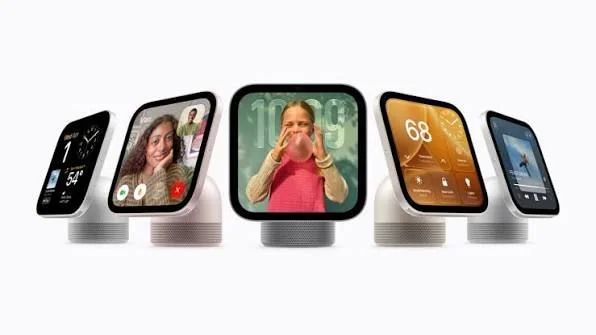
Several owners describe HomeView as a way to put familiar phone tasks somewhere the whole household can reach. One commenter, u/mirinjesse, says it “basically replaces my phone + HomePod in the kitchen,” citing calls, timers, recipes, music and HomeKit controls. The appeal is practical: music can play while someone follows a recipe, and a call doesn’t have to occupy the phone they’d otherwise use.
That shared access matters to families, too. “Kids in the kitchen can facetime with grandparents without taking my phone,” writes u/Internal-Pomelo757, who also mentions recipes, visual timers and music. Another owner, u/chente08, describes using the display for doorbell camera views and notifications, thermostats, smart lights, a nursery camera and photos.
These are modest tasks, but that’s the point. A home screen doesn’t have to replace a tablet or become a destination for hours of entertainment to be useful. A quick glance at the door, a call from the kitchen or a music control within reach can justify a place on the counter. The device’s value comes from being available at the moment a household needs it.
Even a largely critical discussion includes owners who find that day-to-day role worthwhile. The original poster in one thread reportedly says calls and timers work, despite broader dissatisfaction. That doesn’t resolve complaints elsewhere; it does show why user experiences can diverge. People judge the same product against different routines, and a device can be useful even when its owner wants substantial fixes.
Reliability matters more than adding another feature
The strongest complaints concern basic functions that should be easy to trust. In one discussion, u/snowace56 writes, “The fact that I can’t set a timer with Siri is really annoying.” Another participant, u/MBSMD, says their unit arrived the previous day and they “have no such issues,” while acknowledging that there are bugs. The disagreement leaves an important detail unresolved: why a routine task works for one owner and fails for another.
A separate user, u/bizzarefoods, reports that HomeView “can’t stay connected to my phone” and repeatedly says the devices need to be on the same network. The original poster in the timer discussion also says faces disappeared after a reboot, followed by Siri connection problems. Those reports are not enough to identify a shared cause, but they point to the kind of friction that can quickly outweigh convenience. When a timer or connection needs troubleshooting, a household may simply reach for the phone it was meant to leave aside.
Early user discussions can reveal the kinds of issues owners encounter, but they can’t show their prevalence. The threads don’t establish whether software versions, network configurations or later fixes account for some of the different experiences. For now, a prospective buyer has anecdotes to consider rather than a reliable measure of failure rates.
The iPhone remains part of the product experience
HomeView’s role is also shaped by what it can do without an iPhone. One owner, u/FewPipe816, praises music and recipe mode and says they’re happy with the device, while asking why some widgets that can be placed on the home screen say they’re “only available on iPhone” when opened. The complaint captures a broader tension: a dedicated home display can be convenient, but that convenience shrinks if familiar controls lead straight back to the phone.
Another commenter, u/GiggleyDuff, wants to play Spotify for their children on HomeView while watching YouTube on a phone with AirPods. That’s a specific desired setup, not evidence of how every HomeView and phone combination behaves. Still, it highlights a sensible test for any shared screen: can it keep serving the household while its owner uses their phone for something else?
There’s a product boundary to keep in mind as well. TechRadar’s Cat Ellis reports that HomeView doesn’t offer unrestricted App Store access. Buyers expecting an iPad on a stand may therefore be disappointed by its app limits. That’s a separate concern from a timer that fails or a device that loses its connection: one reflects the product’s scope, the others reflect reported problems with the experience.
Owners disagree about how much potential is enough
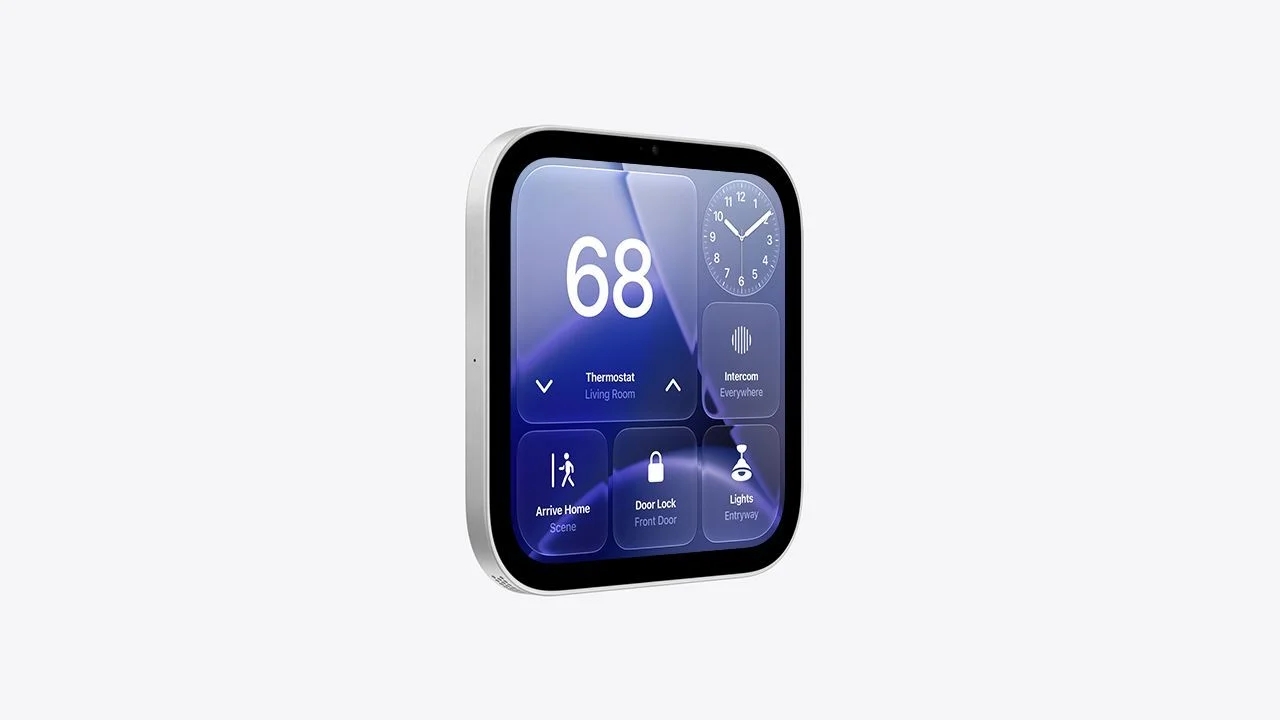
One detailed owner account praises live camera previews, music controls and Handoff, while describing frustrations with widget rearrangement and volume adjustment. Despite those rough edges, u/idealdreams says, “All in all, I would buy again.” That’s a meaningful distinction: some people already see enough utility to accept awkward software interactions.
Others have less patience. u/Extreme-Nerve3029 says, “First time as a lifelong Apple user that I feel like a beta tester,” and says they intend to return the device. Another commenter, u/JoelMDM, pushes back on the idea that future potential should settle the question: “‘Potential’ is worthless unless it’s free.” These remarks express different expectations about buying a new product, not a consensus about what Apple will fix.
My read is that HomeView has a clearer case as a household control point than as a general purpose screen. That case depends on the functions a buyer plans to use working reliably today. A promise of better software later won’t help someone who can’t set a timer or keep a connection stable, while a buyer who mainly wants music, calls and camera views may already find enough value.
Judge the device by the routine it needs to handle
Before buying, list the jobs HomeView would actually take on: a family call while cooking, music in the kitchen, a recipe on display or a quick view of the front door. Then consider how often those jobs would still require an iPhone and whether the available apps match the intended use. The useful question isn’t whether HomeView has the potential to do more; it’s whether the screen saves effort in the routines that matter now.
Hands-on reviews offer another perspective on the product’s limits. Tom’s Guide praises the hardware and audio while criticizing widget limitations and Siri’s performance against rival assistants. TechRadar’s review is largely positive, with caveats about third-party apps and some slow Siri responses. Those assessments align with the practical divide in owner comments: the hardware can appeal while software and app boundaries shape daily satisfaction.
HomeView’s early owners aren’t simply choosing between enthusiasm and disappointment. Some are happy with its role and still want changes; others find that trouble with basic tasks undermines the reason to keep it. Until broader evidence clarifies how often those problems occur, the most useful buying test is concrete: does HomeView already make a repeated household task easier, or does it add another screen to manage?


