Kubernetes AI Agent Sandboxing: Five Layers for Isolating Untrusted Code
Giving an AI agent permission to execute code creates a workload that can change its own behavior while it runs. It may install packages selected by a model, execute freshly generated scripts, and keep iterating until a test passes. On a personal machine, the consequences may stay local. On a shared Kubernetes cluster, a weakness in the isolation boundary can put other workloads and the host node in reach.
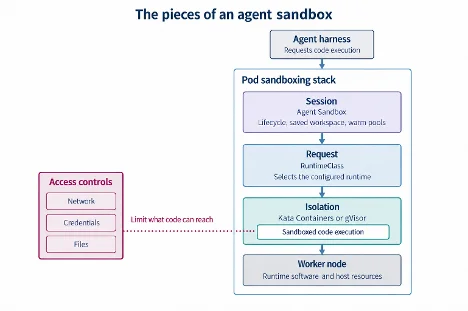
That makes sandboxing a platform design decision, rather than a single container setting. Kubernetes teams need to decide how much isolation an agent needs, prepare nodes to provide it, limit what the workload can access, account for the extra resources, and manage the agent’s environment across pauses. These choices fit into five connected layers, assembled from established cloud native components.
The concern has reached platform teams running agents on Oracle Cloud Infrastructure (OCI), whose users have asked for help running agent workloads on shared infrastructure. Kubernetes offers several ways to build that isolation stack. The useful question is how their tradeoffs fit a particular workload.
KubeCon + CloudNativeCon takes place in Salt Lake City, Utah, from November 9 to 12. Register now.
Choose the isolation boundary first
Isolation options range from a container sharing the host kernel to a pod running inside its own lightweight virtual machine. The choice trades performance and density against the separation between agent code and the node. That boundary matters because restricting system calls can reduce exposure, but an allowed call that reaches a kernel vulnerability can still threaten the host.
runc is the performance-oriented option. Containers use Linux namespaces to separate their process, filesystem and network views, while cgroups control resource consumption. Seccomp filters can restrict the system calls a process makes. But the workload still shares the host kernel, so the security boundary depends on that kernel.
gVisor places a user-space application kernel, called Sentry, between a workload and the host. Instead of booting a guest Linux kernel, it handles system calls through a limited interface. That design can start quickly and support dense packing, while reducing direct access to the host kernel. The tradeoff is compatibility: gVisor implements a subset of Linux, so an application that depends on an unsupported interface may not work as expected.
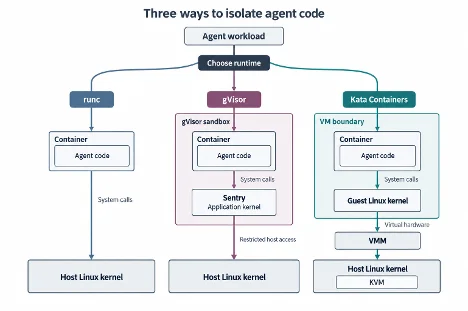
Kata Containers runs each pod in a lightweight virtual machine with its own guest kernel. This adds VM startup time and memory use, but it gives the workload a kernel separate from the host. Agents may run package managers, compilers, nested builds or headless browsers, and the wider Linux compatibility of a guest kernel can matter when those tools are unpredictable.
A separate guest kernel with hardware virtualization avoids surprises where system-call emulation falls short and unexpectedly handcuffs agents.
Prepare nodes for the selected runtime
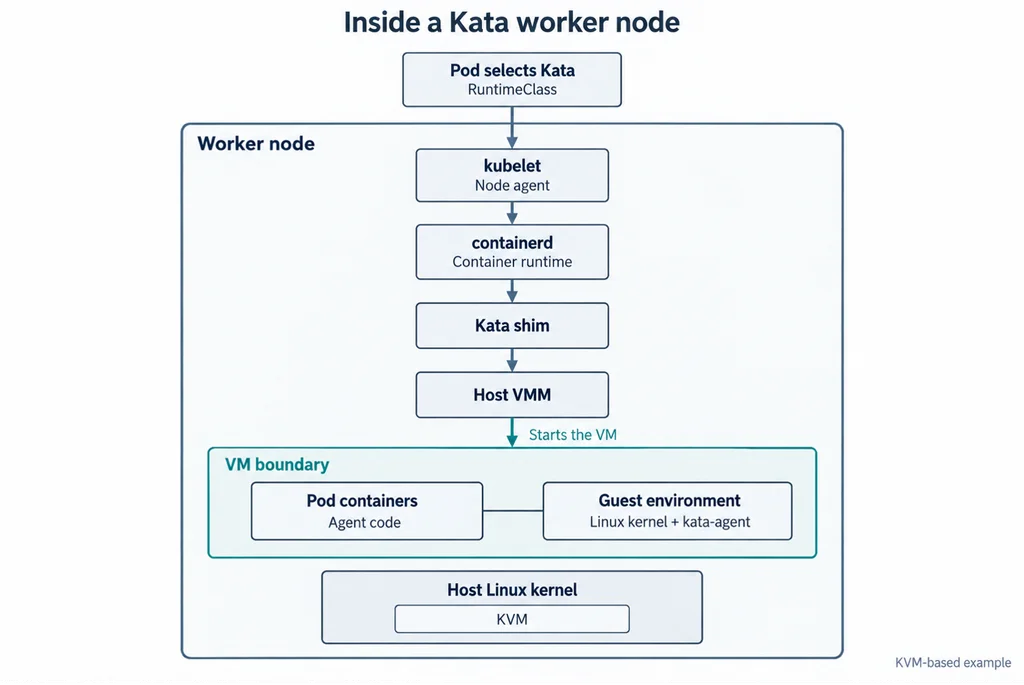
A pod can request a runtime only when its worker node has that runtime installed and configured. For runc, nodes need a container runtime such as containerd; namespaces and cgroups provide the familiar container setup without a guest kernel or hypervisor.
gVisor adds node-level components. Sentry handles workload system calls, and a separate Gofer process mediates access to host-backed files. Each eligible node needs the gVisor runtime installed and integrated with containerd.
Kata requires more pieces: its runtime shim, a supported virtual machine monitor, KVM and hardware virtualization, plus a guest kernel image containing kata-agent. Nodes may need to be bare metal or support nested virtualization. The guest image also needs maintenance; a kernel vulnerability can mean patching both the host and guest kernels. That operational load comes with the stronger separation and workload flexibility.
Limit what the agent can reach
A runtime sandbox protects the host boundary, but it does not automatically protect everything made available inside the pod. Agent code may delete a writable repository, read a mounted secret or send data to any destination allowed by the network. As sandboxing agents involves more than choosing a runtime, access policy needs to be designed alongside isolation.
- Network: Start with default-deny egress using a
NetworkPolicy, then allow only the destinations a task requires, such as a package mirror or model endpoint. - Credentials: Provide short-lived credentials scoped to the task instead of mounting persistent tokens. If a credential leaks, its useful lifetime ends with the task.
- Storage: Mount repositories and data read-only when possible. Give tasks that need to write a separate workspace volume.
- Remote tools: Apply authorization to API endpoints and MCP servers themselves. Those services run outside the pod’s sandbox boundary.
Expose isolation through RuntimeClass
Kubernetes RuntimeClass lets a pod select a configured runtime while keeping the standard Pod API. A platform can offer different runtime classes so agent workloads can opt into additional isolation without applying its resource cost to every workload.
That added isolation consumes resources and can affect readiness. gVisor adds Sentry processes; Kata adds a guest kernel, kata-agent and virtual machine monitor. Administrators can specify fixed pod overhead in the RuntimeClass so the scheduler and quotas account for it. The example below uses 160 MiB of memory and 250 millicores, but those figures are illustrative: measure the actual workload before setting values.
apiVersion: node.k8s.io/v1
kind: RuntimeClass
metadata:
name: kata
handler: kata # runtime name in the node's containerd config
overhead:
podFixed:
memory: "160Mi" # example value; measure your own
cpu: "250m"
scheduling:
nodeSelector:
sandbox.example.com/kata: "true"
A pod opts in through the runtimeClassName field of its spec:
apiVersion: v1
kind: Pod
metadata:
name: agent-task
spec:
runtimeClassName: kata # or gvisor; omit for the default runc
containers:
- name: workspace
image: python:3.12
In this configuration, the RuntimeClass handler must match the runtime name on the node, and its scheduling rules can direct pods to nodes that support Kata. A pod selects it with runtimeClassName; a pod without that field uses the cluster’s default runtime. Teams can expose each supported runtime as a separate class and choose according to the task’s needs.
Manage the agent’s session lifecycle
Agent workloads often alternate between bursts of code execution and long waits for another model or human interaction. Leaving a VM running makes resumption easier but ties up capacity. Deleting it frees resources but can mean rebuilding the environment. Warm pools offer a compromise, though they also reserve capacity.
The Kubernetes SIG Apps Agent Sandbox project provides an API for stateful, single-pod environments with stable identities and persistent storage. Its extensions include templates, claims and warm pools. The project stays runtime-agnostic: the Sandbox API handles the session environment, while the selected RuntimeClass determines pod isolation. SIG Apps is described at the Kubernetes community site.
That division gives platform teams a way to combine session management with the runtime they have configured, rather than tying an agent framework to one isolation mechanism. Community components also let teams work with familiar Kubernetes APIs and use pod specifications across conformant clusters. The practical design task is to measure each workload, choose a suitable runtime, and connect that choice to node support, access rules, scheduling overhead and session lifetime.
The five layers work as a stack: the runtime defines the isolation boundary, the node provides it, access policy constrains the agent’s reach, RuntimeClass makes it selectable, and Agent Sandbox manages its working session. Getting those decisions aligned is what makes untrusted agent code workable on shared Kubernetes infrastructure.
The post The 5 essential layers of AI agent sandboxing on Kubernetes appeared first on The New Stack.


