Cloud SQL for MySQL Adds Managed Blue-Green Database Upgrades
Test the upgrade while production keeps running
Database version upgrades often turn into operational projects. Teams coordinate across functions, reserve a maintenance window and prepare for downtime that can stretch while they work through compatibility checks or unexpected problems. Google Cloud’s preview of managed blue-green deployments for Cloud SQL for MySQL changes the sequence: it builds and synchronizes an upgraded copy while the current database continues serving traffic.
The approach is aimed at major upgrades, such as moving from MySQL 8.0 to 8.4, as well as configuration changes. Teams can test the upgraded environment with production data before deciding to switch over. That separation matters because an upgrade can pass basic checks and still expose application behavior that only appears under realistic data or query patterns. The feature is available through the Cloud SQL console or CLI, and the original instance remains available as a fallback after the change.
This is more significant than it looks: the service is changing how teams manage the risk around the upgrade, not removing the need to judge whether the new database behaves correctly. Cloud SQL can coordinate the infrastructure steps, but application testing and the decision to cut over remain operational responsibilities.
What happens during a deployment
Cloud SQL manages three stages. The blue environment is the existing production instance. The service creates a temporary green clone, upgrades it to the selected database version and keeps it synchronized through continuous replication. In practical terms, the green copy gives teams a place to inspect the target version while blue remains the system handling live requests.
When the team initiates the switchover, Cloud SQL briefly makes blue read-only, applies the final synchronization and promotes green to primary. That last sync is the point where the two environments converge before roles change. The sequence reduces the need to perform the entire upgrade against the production instance, though teams still need to plan around the moment when writes are paused.
- Prepare: Production continues serving application traffic while Cloud SQL creates and upgrades the green environment. Teams can use this period to prepare checks and identify the application paths that matter most for the upgrade.
- Verify: Teams can connect applications and run queries against the upgraded copy before changing production traffic. This provides a practical test window, although the value depends on whether the checks reflect real workloads and important edge cases.
- Switch: Cloud SQL completes synchronization and moves the primary role to green. If a problem appears before the switch, teams can cancel the deployment without changing the live database. That clear boundary helps teams make the cutover decision with a working production system still in place.
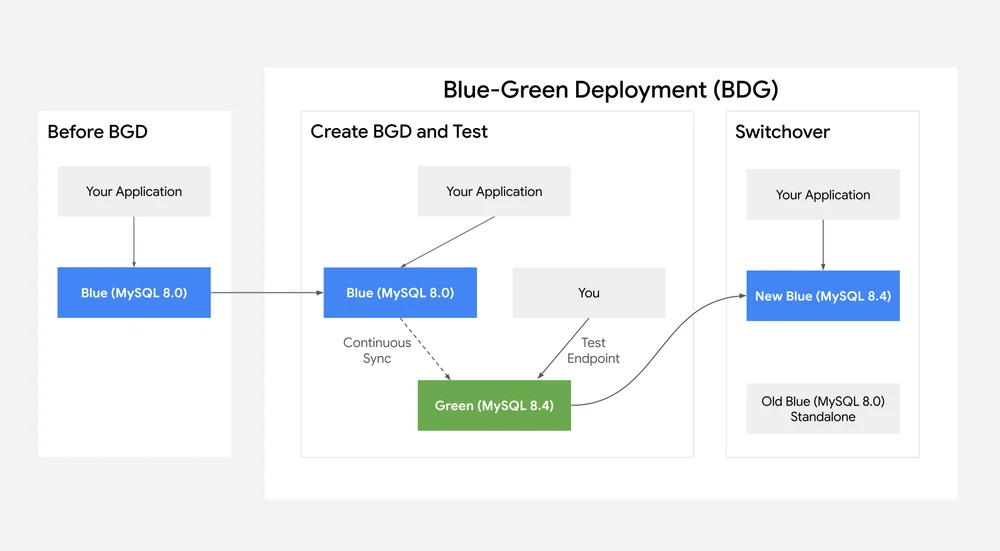
For Cloud SQL Enterprise Plus, Google says maintenance downtime during cutover is less than a second. Cloud SQL also transfers the existing database IP address, instance name and backups to the new database, so applications don’t need revised connection strings or configuration changes. Those details reduce the amount of application-side coordination teams need to do, but they don’t replace checks that the application can connect and behave as expected after the primary changes.
A shorter path from testing to cutover
Managed orchestration addresses much of the work involved in building a manual blue-green process: creating a parallel instance, keeping data synchronized and coordinating the switch. The practical gain is more room to assess application behavior against a live data copy before committing to an upgrade. Similar systems typically shift effort from infrastructure coordination toward testing and decision-making; teams still have to decide what constitutes a successful test.
That said, a shorter cutover window isn’t the same as a risk-free upgrade. A test environment can reveal compatibility problems, but its usefulness depends on the queries and application paths teams actually exercise. If you’re working in this space, the key question is whether your pre-cutover checks cover the operations your users rely on.
A CLI workflow can create the green deployment, retrieve its status, connect to the target instance, switch over and later remove the old source:
# Create the synchronized, upgraded green deployment environment
gcloud sql blue-green-deployments create my-upgrade \
 --source-instance=prod-mysql-db \
 --target-database-version=MYSQL_8_4

# Check the status and get the test endpoint
gcloud sql blue-green-deployments describe my-upgrade \
--region=us-central1

# Connect and test the upgraded copy
gcloud sql connect TARGET_INSTANCE_NAME --user=admin

# Switch your live traffic to the upgraded database in seconds
gcloud sql blue-green-deployments switchover my-upgrade

# Clean up the old database when you're ready
gcloud sql blue-green-deployments delete my-upgrade \
 --region=us-central1 \
 --delete-old-source
The original blue instance can remain as a manual fallback after cutover. That gives teams a way to retain the previous environment while they assess the new primary, while the pre-cutover cancellation path leaves production untouched if testing surfaces a problem. The distinction matters: cancellation is available before the switch, while keeping the old source afterward gives teams an option to return to it manually if the new primary raises concerns.
And this is the part most people overlook: a fallback is useful only if teams understand how they’ll use it and how long they intend to retain it. The feature preserves an option, but operational readiness still depends on having a clear response when testing or post-switch monitoring finds trouble.
Preview scope
The preview supports standalone Cloud SQL for MySQL primary instances, including High Availability configurations. PostgreSQL support is expected later. That scope makes the feature relevant to teams already using supported MySQL instances, while other database setups will need to wait for support that Google hasn’t yet included in this preview.
For teams planning a major MySQL upgrade, the key change is operational: testing, synchronization and cutover can happen as a managed sequence, with production downtime concentrated in the final switch. The service narrows the disruptive part of the work, but the quality of the upgrade still rests on how well teams test the new version and monitor it once it becomes primary. A much smaller maintenance window. Still a migration to manage.
Start from the Cloud SQL console or review the step-by-step documentation.


