Google Cloud Spend Caps Add API Controls, Live Cost Reports and Monthly Resets
Google Cloud’s spend caps have reached general availability, giving teams a way to stop eligible usage when project spending crosses a budget threshold—without deleting resources. That distinction matters operationally: a cap can interrupt a cost source while leaving the project’s underlying setup available for review. The release adds API controls, faster cost reporting and automatic monthly resets, addressing the work involved in applying and reviewing caps across many projects. It also puts more responsibility on teams to decide which workloads can tolerate an interruption.
Three changes to day-to-day cost controls
The new spend caps API is available through the Cloud Billing Budgets API. Teams can create, update, lift or delete caps programmatically, including as part of provisioning a new developer sandbox. That makes it practical to apply financial guardrails across projects without managing every cap by hand. It also lets teams treat a cap as part of a project’s setup, where it can be reviewed alongside the other controls attached to that environment.
That automation can help when projects are created and retired frequently, though it still depends on teams choosing sensible thresholds and assigning the right cap to each workload. A cap that’s too low can interrupt legitimate work; one that’s too high may offer little protection against an unexpected surge. The API reduces repetitive administration. It doesn’t make those decisions for the team.
Cost Reports now show the estimated live costs that trigger caps on AI services. Because enforcement can begin within minutes of usage, this view gives teams a faster way to see what spending caused a cap to activate. Standard billing data can take hours to settle, leaving a gap between enforcement and the information needed to investigate it. Faster visibility can narrow that gap, although the reported figures are estimates rather than a final accounting of settled charges.
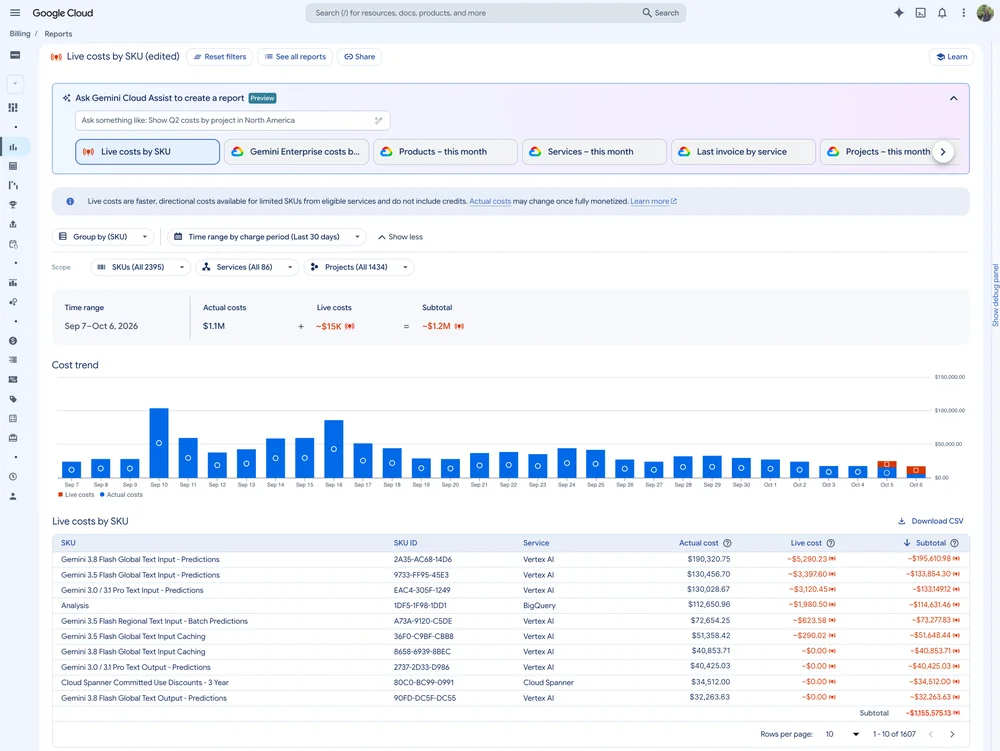
Caps that block a service will now reset automatically at the start of each month, allowing that service to resume. This removes a recurring manual step for teams comfortable with automatic restoration, but it also means a cap isn’t a permanent shutdown. Organizations that require a manual audit before restoring access can keep using the existing manual override. The choice comes down to how much continuity a service needs and how much review its owners want before usage resumes.
Where to apply caps, and what they stop
Google recommends starting with non-production workloads, such as developer sandboxes, test clusters and experimental AI agent environments. These settings can be useful places to observe how a cap affects real workflows before extending the policy to services with stricter availability needs. Low-dollar limits can help teams learn whether the alerts arrive at the right time and whether the affected work can pause safely. That early experience can inform later configuration, though each workload still needs its own review.
Billing administrators and project owners receive default alerts when usage reaches 50%, 80% and 100% of a cap. Teams should check that those roles include the people responsible for responding to cost alerts. Otherwise, a notification may reach someone who can see the warning but can’t investigate or act on it quickly. Spend cap permissions can also be added to custom roles, giving organizations another way to align access with their internal responsibilities.
There’s an important distinction between usage-based charges and reserved capacity. Caps stop pay-as-you-go requests and requests covered by committed use discounts (CUDs) after the threshold is reached. Provisioned Throughput isn’t stopped: requests using that reserved capacity continue to serve traffic. For teams planning around a cap, that boundary affects what the control can actually interrupt. The cap applies to eligible usage, not every way a service might handle requests.
Pairing enforcement with anomaly detection
Spend caps provide a hard limit; Google Cloud’s Early Anomalies Detection is designed to surface unusual cost patterns earlier. It analyzes daily cost signals, alerts teams to directional spending changes and can identify the SKU behind a trend. Together, the tools offer a two-step approach: spot a developing cost spike, then pause eligible usage if spending crosses the configured limit. The first tool is an early warning; the second is an enforcement mechanism.
That separation is useful because an alert and a cap solve different problems. An anomaly can prompt investigation while the workload is still running, whereas a cap acts after its threshold is reached. And yet, neither feature removes the need to understand why usage changed or whether stopping it is acceptable. If you’re working in this space, the practical question is whether the alert reaches someone who can respond before the cap interrupts a service.
Playbook step |
Feature |
Focus |
Core action |
Key benefit |
Step 1 |
Early anomalies |
Predictive monitoring |
Analyzes daily cost signals and flags directional spending changes |
Surfaces unusual increases and identifies the SKU driving the trend |
Step 2 |
Spend caps |
Financial enforcement |
Pauses usage for a project or service after its budget is breached |
Limits runaway spending without deleting resources |
Setting up a spend cap
Teams can configure caps in the Google Cloud Billing Console’s Budgets and Alerts page. Google’s spend caps documentation covers setup, while the API documentation explains how to add caps to deployment workflows. The practical shift is that cost limits can now be managed as code, reviewed with faster cost data and refreshed on a monthly schedule. That can make policies easier to apply consistently across projects, provided teams also keep the thresholds and permissions current.
What the release changes for cloud teams
This is more significant than it looks for teams managing many short-lived projects: a cap that can be created through an API is easier to attach to routine provisioning than one that depends on a person remembering a console step. The gain is administrative consistency, not automatic cost judgment. Teams still need to decide which services may stop, who receives alerts and whether usage should resume as soon as the month turns.
Here's the thing: a spending limit only helps when its boundary matches the system it’s meant to protect. Faster cost reporting can make a cap activation easier to diagnose, and anomaly detection can flag a change before the threshold is reached. But some capacity remains outside the cap’s enforcement, and interrupted workloads may have consequences for the people relying on them. A useful rollout therefore starts with modest, observable environments and expands only as owners understand the behavior.
There’s still operational work. Teams will need to review cap settings as projects change, confirm that alerts reach the right responders and account for the different treatment of reserved capacity. The new controls give cloud operators more ways to put limits into practice. Their value will depend on how carefully those limits reflect the workloads they govern.


