How to Operate AI Agents Safely in Production: Ownership, Permissions, and Limits

At 2:07 a.m., an AI agent can turn into an operations problem before anyone has time to debate which model it ought to use. The application is still up, but a downstream API is failing and requests are timing out. The agent has retried twice, burned more tokens than usual, and taken roughly twice as long to respond.
Start with the ownership question: who is responsible for this system right now? Teams building AI agents can spend weeks tuning prompts, retrieval, tools, and model choices. Those decisions matter. But an agent in production also needs an accountable owner, defined limits, useful telemetry, failure policies, escalation routes, and clear rules for when a person must take over. That’s what separates a dependable service from an operational liability.
Here’s the thing: an agent shouldn’t move straight from reasoning to action. Tool calls need explicit controls and visibility, with a defined route to human intervention. The practical starting point is to treat the agent like a production service, then build its safeguards around that identity.
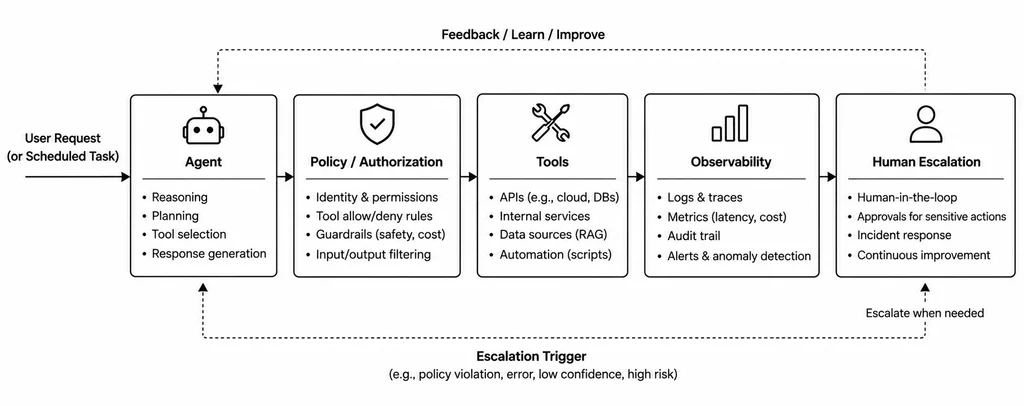
Step 1: Give the agent an operational owner
A production agent needs the same kind of identity as any other service: a name, an accountable team, a service tier, and somewhere to escalate problems.
Python
from pydantic import BaseModel
class AgentService(BaseModel):
name: str
owner_team: str
service_tier: str
escalation_channel: str
agent_service = AgentService(
name="incident-command-agent",
owner_team="platform-engineering",
service_tier="critical",
escalation_channel="#platform-oncall",
)
This small record changes how the system is treated. The agent is no longer an experiment running inside a Python process; it has a responsible team and an escalation channel. The same metadata can later be attached to logs, traces, dashboards, alerts, and deployment records.
Step 2: Set hard limits on what it can do
Permissions define the agent’s risk. A system that reads telemetry is less consequential than one that can restart production services, alter infrastructure, or deploy code.
An explicit allowlist makes those permissions deliberate. The default should be to deny a tool unless someone has approved it:
Python
ALLOWED_TOOLS = {
"get_service_health",
"get_recent_deployments",
"search_runbooks",
"summarize_incident",
}
class ToolAuthorizationError(Exception):
"""Raised when an agent attempts to use an unapproved tool."""
def authorize_tool(tool_name: str) -> None:
if tool_name not in ALLOWED_TOOLS:
raise ToolAuthorizationError(
f"Tool '{tool_name}' is not authorized."
)
New capabilities should require an engineering decision, not appear automatically because a tool is available. For destructive actions such as restarting a service or deploying code, require authenticated human approval. The agent’s own judgment isn’t an authorization mechanism.
Step 3: Put a ceiling on execution
An agent that can keep reasoning indefinitely is hard to operate. Set limits for run time, model calls, tool calls, and, where possible, token use. The example below makes step and tool-call limits configurable, with environment-variable defaults and a check that rejects nonpositive values.
Python
import os
class ExecutionBudget:
def __init__(
self,
max_steps: int | None = None,
max_tools: int | None = None,
):
self.steps = 0
self.tool_calls = 0
self.max_steps = (
max_steps
if max_steps is not None
else int(os.getenv("MAX_AGENT_STEPS", "5"))
)
self.max_tools = (
max_tools
if max_tools is not None
else int(os.getenv("MAX_TOOL_CALLS", "8"))
)
if self.max_steps  None:
if self.steps >= self.max_steps:
raise RuntimeError(
"Agent step budget exceeded."
)
self.steps += 1
def check_tool_call(self) -> None:
if self.tool_calls >= self.max_tools:
raise RuntimeError(
"Agent tool-call budget exceeded."
)
self.tool_calls += 1
Passing limits into the constructor lets teams give different workflows different budgets without changing global settings. A diagnostic agent might need three steps; a research workflow could need more. The essential requirement is a ceiling that applies to the whole run, not a value hidden in application code.
Step 4: Make model calls visible
Ownership is mostly ceremonial if nobody can see what the agent is doing. At minimum, capture request latency, model name, success or failure, tool calls, token use when available, a correlation or request ID, and escalation events.
A wrapper creates a useful logging boundary:
Python
import logging
import time
import uuid
logger = logging.getLogger(__name__)
def invoke_model(model, messages):
request_id = str(uuid.uuid4())
started = time.perf_counter()
# Extract the model name across different provider libraries.
model_name = (
getattr(model, "model_name", None)
or getattr(model, "model", None)
or "unknown_model"
)
try:
response = model.invoke(messages)
elapsed = time.perf_counter() - started
logger.info(
"agent_model_call_success",
extra={
"request_id": request_id,
"model": model_name,
"latency_seconds": round(elapsed, 3),
},
)
return response
except Exception:
elapsed = time.perf_counter() - started
logger.exception(
"agent_model_call_failed",
extra={
"request_id": request_id,
"model": model_name,
"latency_seconds": round(elapsed, 3),
},
)
raise
When several services are involved in an incident, the request ID helps an engineer follow the trail from an alert to the agent request, then to the model and tool calls behind it. Production systems should pair logs with distributed traces and metrics to show system behavior and performance more fully.
Step 5: Treat errors and escalation as separate decisions
A failed model call doesn’t automatically mean the entire service must fail. And a successful response doesn’t mean the agent’s recommendation should be carried out. Those are separate decisions.
One failure handler can record the problem and return a clear handoff:
Python
def handle_agent_failure(error: Exception) -> dict:
logger.error(
"Agent execution failed; escalating to human.",
exc_info=(
type(error),
error,
error.__traceback__,
),
)
return {
"status": "escalated",
"message": (
"The AI agent could not complete the operation. "
"Human intervention is required."
),
"error_type": type(error).__name__,
}
The agent may be unavailable, but engineers should still be able to respond through the underlying workflows and runbooks. That’s graceful degradation: the service can fail without taking the incident response process down with it.
Step 6: Require human approval for risky actions
Keep recommendation and execution apart. An agent can diagnose an issue and suggest a change, but a model-generated answer shouldn’t be enough to alter production.
Telemetry
↓
AI Agent
↓
Diagnosis
↓
Recommended Action
↓
Risk Check
↓
Human Approval
↓
Production Change
For example, the agent might recommend increasing the database connection pool. A person should approve that change before it reaches production.
Python
def execute_action(
action: str,
approved_by: str | None,
) -> dict:
if not approved_by:
return {
"status": "awaiting_approval",
"action": action,
}
return {
"status": "approved",
"action": action,
"approved_by": approved_by,
}
A real approval system will need more than this sketch, but the boundary is the point: the agent can reason about an action without holding the authority to approve it.
Step 7: Separate liveness from readiness
A production agent needs health endpoints. With FastAPI, one check can report whether the application process responds, while another checks whether required dependencies are available.
Python
import os
import httpx
from fastapi import FastAPI, Response, status
app = FastAPI()
SERVICE_NAME = "incident-command-agent"
@app.get("/health/live")
async def liveness():
"""Check whether the application process is responsive."""
return {
"status": "alive",
"service": SERVICE_NAME,
}
async def check_provider() -> bool:
"""Check a configured provider health endpoint."""
health_url = os.getenv("MODEL_PROVIDER_HEALTH_URL")
if not health_url:
return False
try:
async with httpx.AsyncClient(timeout=2.0) as client:
result = await client.get(health_url)
return result.status_code == 200
except httpx.RequestError:
return False
@app.get("/health/ready")
async def readiness(response: Response):
"""Check whether required dependencies are available."""
if not await check_provider():
response.status_code = (
status.HTTP_503_SERVICE_UNAVAILABLE
)
return {
"status": "unhealthy",
"reason": "Model provider unavailable",
}
return {
"status": "ready",
"service": SERVICE_NAME,
}
Liveness answers whether the process is responsive. Readiness asks whether it can handle requests, including whether the configured model-provider health endpoint responds. Here, a failed check returns HTTP 503, and the request has a two-second timeout to keep the check lightweight.
In a real deployment, adapt the check to the provider’s supported health mechanism and other essential dependencies, such as a vector database or configuration service. Keeping readiness separate from liveness helps an orchestrator such as Kubernetes decide whether to restart a process or temporarily stop sending it traffic.
Step 8: Stop when safety controls fail
An agent shouldn’t continue as though all is well when its safeguards are unavailable. Different failures need different outcomes: an authorization error blocks the action; an exhausted budget triggers escalation; other errors follow the system’s failure policy.
Python
def run_controlled_agent(
tool_name: str,
model,
messages,
budget: ExecutionBudget,
):
try:
authorize_tool(tool_name)
# Reuse the budget across agent steps and tool calls.
budget.check_step()
budget.check_tool_call()
return invoke_model(
model,
messages,
)
except ToolAuthorizationError:
logger.exception(
"Agent authorisation check failed."
)
return {
"status": "blocked",
"message": (
"The requested operation is not authorised."
),
}
except RuntimeError:
logger.exception(
"Agent execution budget exceeded."
)
return {
"status": "escalated",
"message": (
"The agent exceeded its execution budget. "
"Human investigation is required."
),
}
except Exception as exc:
return handle_agent_failure(exc)
The budget has to persist across the workflow. If every invocation creates a fresh one, each call resets the counters and repeated calls can evade the limit. Create it once, then reuse it:
Python
# Create one budget for the entire agent workflow.
budget = ExecutionBudget(
max_steps=5,
max_tools=8,
)
# Reuse the same budget across successive invocations.
for tool_name in planned_tools:
result = run_controlled_agent(
tool_name=tool_name,
model=model,
messages=messages,
budget=budget,
)
if isinstance(result, dict) and result.get(
"status"
) in {"blocked", "escalated"}:
break
Each step and tool call now counts against the workflow’s shared ceiling. When the limit is reached, execution stops instead of starting over with a fresh allowance. Safeguards only help if they remain active through repeated calls and failures.
Step 9: Write the 2 a.m. runbook
Operational ownership becomes concrete when the on-call engineer has answers ready. If the agent starts failing in the middle of the night, they should be able to find out quickly:
- Is the agent itself healthy?
- Is the model provider healthy?
- Are retrieval or tool dependencies failing?
- Has the agent exceeded its usual cost or latency range?
- What happens if the agent is disabled?
The last question deserves particular attention. Every production AI system needs a defined way to degrade safely. For an incident-response agent, that might mean:
When the agent fails, the operating model matters
An AI agent should make operations faster without becoming a single point of failure. If it goes offline, the incident still needs to be logged, telemetry must remain accessible, and the standard runbook should take over so an engineer can continue the investigation.
That fallback only works when production ownership is clear. “The AI team” isn’t an answer. Teams need named responsibilities for deployment, infrastructure, model settings, tool access, monitoring, incident response, cost, security, rollback, and the decision to switch the agent off. Those duties can be shared; the handoffs can’t be a mystery when an incident starts.
The 2 a.m. test
An agent is easy to operate when everything works during business hours. The harder test comes in the middle of the night: can someone be paged, see what happened, understand what the agent did, and keep working if it’s unavailable?
That requires limits on how much the agent can do, visibility into its actions, permissions that constrain those actions, and a usable fallback. The point isn’t to remove people from the process. It’s to make the boundary between the agent’s responsibility and the engineer’s clear. The model’s intelligence matters less than whether the on-call engineer knows what to do next.
For teams putting agents into production, that’s the practical standard: the system must remain operable when the agent doesn’t.
The post Who on-calls an AI? This is the unresolved crisis of agent ownership appeared first on The New Stack.


