BigQuery ObjectRef Brings Multimodal Data and AI into SQL Workflows
Oct 21, 2026
535 views
BigQuery wants unstructured data in the same workflow
For teams working with images, video, audio and documents, the hard part has often been the plumbing. Files sit in Cloud Storage; models run elsewhere; and their results have to be stitched back into a warehouse before analysts can use them. That handoff adds operational work and can leave database records out of sync. BigQuery’s ObjectRef and multimodal analytics features are now generally available. The announcement’s larger claim is that BigQuery can serve as a single platform for structured and unstructured data, analytics and AI agents. That’s a meaningful shift in where teams can run these workflows, though the announcement doesn’t quantify how much time or cost they’ll save. ObjectRef is a built-in STRUCT that points from a BigQuery row to an object stored outside BigQuery. Teams can keep the file in Cloud Storage and place its reference alongside ordinary relational columns. BigQuery can then pass multiple columns, including multimodal inputs, to Gemini in one SQL query—or through a natural-language query in conversational analytics. Its integrations with BigQuery AI, BigQuery conversational analytics and Gemini Enterprise can combine files with database context such as metadata, timestamps and custom agent instructions. The pitch is that teams can build and govern pipelines that turn unstructured data into structured results, transform it into other unstructured data, or work across modalities, using BigQuery’s serverless compute and built-in inference without separate compute clusters. Keeping the ObjectRef in the same row as extracted features and annotations also preserves access to the source file. That matters: a table of labels and scores can support reporting, but it may lose context that an image, recording or document still contains. The post says customers already use the approach to generate embeddings for multimodal vector search, classify data at scale with generative AI, and extract data and features from large document and media archives—all through standard SQL. One simple example asks BigQuery to summarize the main categories in a public product image dataset: ```sql SELECT AI.AGG(image_ref, "Summarize the major categories of pictures") FROM `bigquery-public-data.cymbal_pets.products`; ```References stored with the data
ObjectRef is a predefined BigQuery STRUCT containing a URI, an authorizer, a version and a details field with Cloud Storage metadata: ```sql -- ObjectRef is a special STRUCT in BigQuery STRUCT { uri STRING, authorizer STRING, version STRING, details JSON { gcs_metadata JSON } } ``` Storing these references in regular BigQuery tables makes files usable alongside conventional columns, while keeping the file itself in Cloud Storage. The two systems can follow independent data lifecycles: changes to a BigQuery table don’t alter the underlying Cloud Storage object, and changes to Cloud Storage don’t alter the table. That design brings several practical benefits. It avoids copying high-volume media into the warehouse, so teams can query files where they’re stored. They can work through SQL or BigQuery DataFrames, and pass ObjectRefs to BigQuery Python UDFs to run open-source libraries such as OpenCV on the data. Version tracking records the Cloud Storage generation, letting a query refer to the precise file version associated with a row even after the source object changes. And BigQuery’s existing security policies and IAM controls can govern, audit and share access to both the table columns and their related files. Since the preview, users have adopted a pattern the post describes as full-fidelity ETL in SQL. BigQuery’s serverless setup lets teams run AI and machine learning in their data environment without separate clusters for moving data and running inference. Treating Cloud Storage objects as BigQuery columns also lets data engineers apply familiar practices—idempotent pipelines, reproducible runs and backfills—to images, video, audio and documents. Here’s the useful distinction: teams can extract structured features while retaining the original ObjectRef in the same row. Those features support filtering, reports and BI dashboards; the source file remains available for analysis that needs more context. For example, sentiment scores and topic tags from customer calls could flag at-risk accounts in a dashboard. A conversational analytics agent could then inspect the original recordings to assess how customers and service representatives handled escalations. The source audio can retain nuance that a table of extracted fields cannot.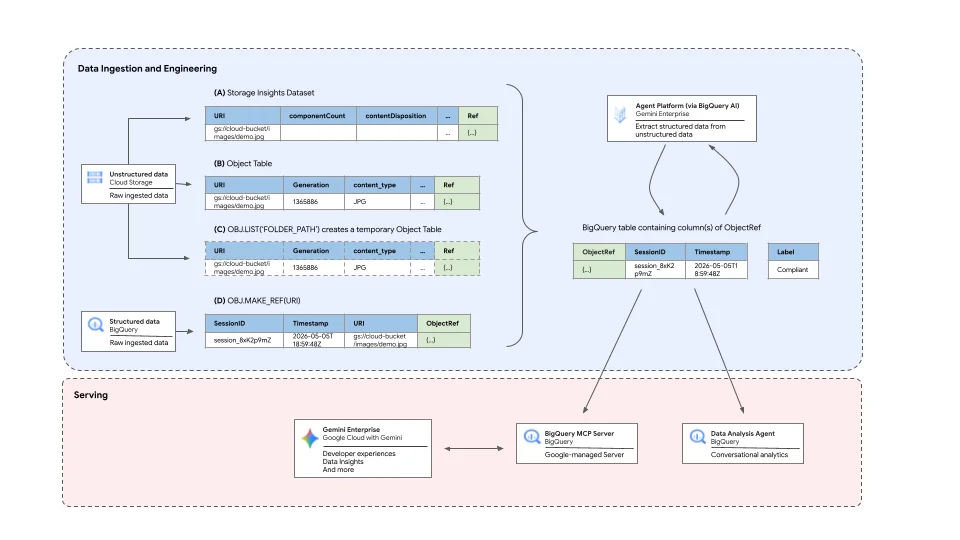
Where customers are applying it
At Snap, the feature has been used to change how reviewers sample public posts. Carlos Ortiz, a data scientist at Snap, described the shift:“At Snap, the safety of our community is a top priority, and we aim to limit users’ exposure to content that violates our Community Guidelines. We regularly review samples of public posts, and by leveraging ObjectRef with BigQuery AI, we transitioned from simple random sampling to post-stratification sampling. This transition improved the efficiency of our human review processes, enabling us to reinvest reclaimed capacity into new and expanded workflows that further enhance our ability to detect and address potentially harmful content.” — Carlos Ortiz, Data Scientist, SnapThe post says preview customers have moved experimental pipelines into production across several workloads: - **Content moderation:** Online platforms combine multimedia assets with telemetry in one BigQuery pipeline to improve moderation and safety outcomes. - **Threat detection:** Enterprise security teams analyze visual and structural web components alongside network logs to identify threats proactively. - **Inventory compliance:** Online retailers search large image repositories for text and context that may reveal regulatory or brand compliance issues. - **Customer experience:** Service organizations analyze customer and support-agent audio with BigQuery AI to assess sentiment and improve service delivery.


