Implementing Vector Similarity Search in PostgreSQL with pgvector
Building Vector Similarity Search in PostgreSQL with pgvector
Introduction
When users are prompted to convey their intents through natural language, traditional search methods often falter. Consider a user typing “something warm and breathable for high-altitude trekking”—a standard keyword search might yield disappointing results, as those search mechanisms strictly rely on word matches.
This is where similarity search steps in. Rather than merely connecting words to records, it digs deeper by matching the underlying meaning of the input. This enables more nuanced interactions with databases, allowing a search for intent even when users don’t express queries in ideal terms.
In this piece, we’re diving into how you can leverage PostgreSQL to implement a similarity search through the pgvector extension. You’ll learn how to set it up, manage vector embeddings, and conduct queries that maintain the simplicity of regular SQL.
What’s more, this tutorial will explore how vector similarity searches function, not only enhancing your search capabilities but also improving the relevance of the results returned.
What Does Vector Embedding Mean?
A vector embedding represents the essence of a data item through a list of floating-point values, bypassing characters or keywords entirely. These embeddings are generated by machine learning models designed to arrange semantically similar content in close proximity within a high-dimensional space. Consequently, even if two phrases do not share any words, their embeddings will reveal their conceptual similarity if they discuss the same ideas.
For instance, consider:
- “Lightweight trail runners for long-distance hiking”
- “Running shoes built for backcountry endurance”
An embedding model would position these representations near each other because their concepts overlap. This foundational principle makes the similarity search effective: a query is embedded, and the nearest vectors in storage are identified to return pertinent rows.
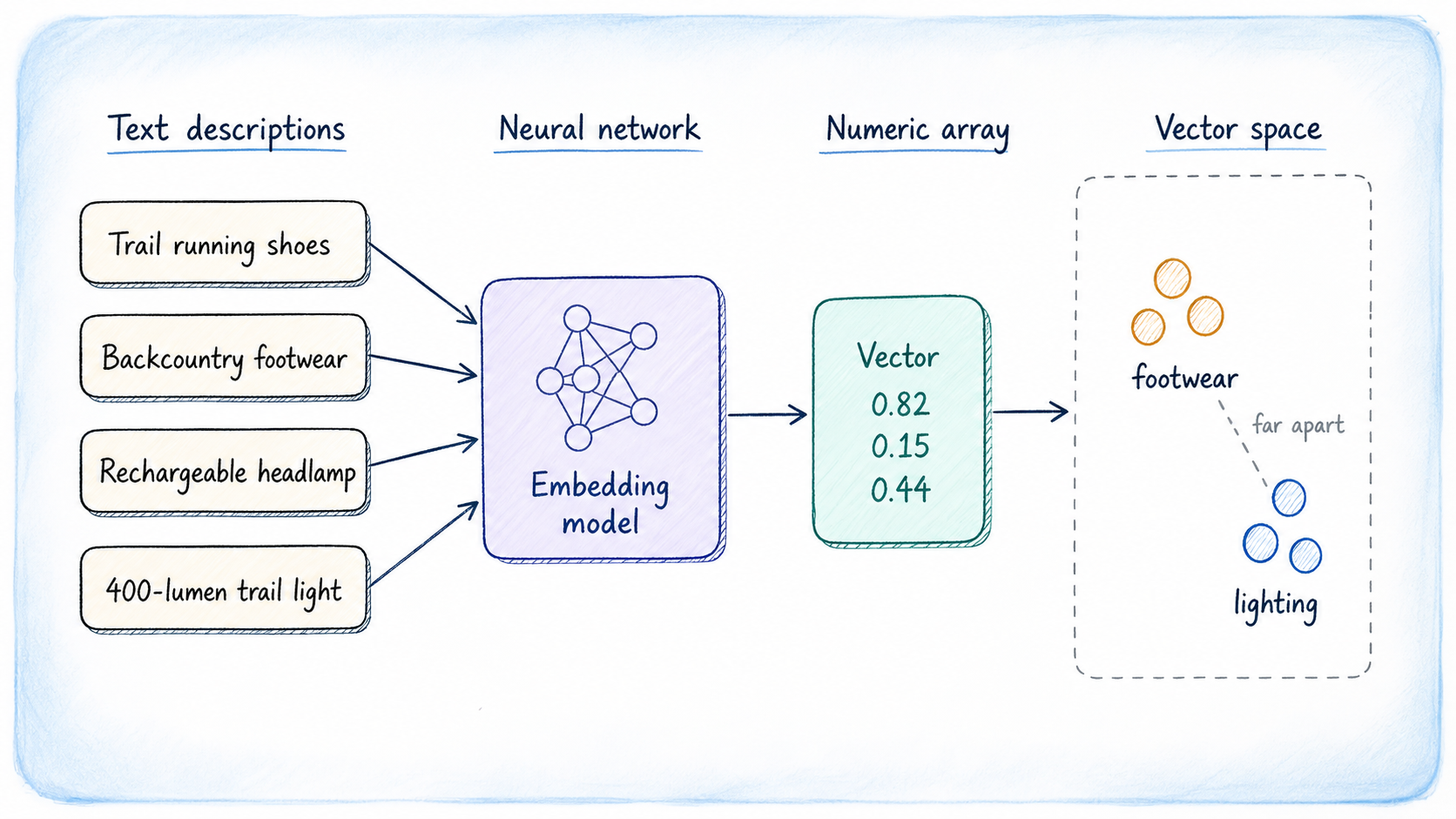
Generating Embeddings
The dimensions of vectors vary based on the model utilized. There are several to choose from, with some of the most prevalent including:
- OpenAI text-embedding-3-small and its larger counterpart, text-embedding-3-large (1536 and 3072 dimensions respectively).
- Cohere Embed v4, a model that is both multilingual and multimodal.
- EmbeddingGemma, which delivers 768-dimensional vectors and supports various languages with on-device inference.
- BAAI/BGE-M3; open-source and versatile, this model supports numerous languages.
- Sentence Transformers, designed for local development where retrieval speed is prioritized over accuracy.
For those comparing embedding models, the MTEB Leaderboard offers valuable insights. But a universal rule applies: ensure that the dimension you configure in your PostgreSQL database aligns precisely with the model’s output dimension.
Understanding pgvector
pgvector is a transformative PostgreSQL extension, integrating native vector search capabilities directly into your existing database setup. This means you can manage your embeddings alongside relational data without migrating to a separate storage system, bolstering the reliability features of PostgreSQL like transaction handling and point-in-time recovery.
This extension introduces a dedicated data type for vector storage, SQL operators that assess similarity, and two indexing methods—HNSW and IVFFlat—to enhance nearest-neighbor searches efficiently. Moreover, it accommodates various vector types, including half-precision, binary, and sparse vectors.
Setting Up pgvector
If you’re on PostgreSQL 13 or newer, you’re in luck. The installation guide details various platforms. Here's the quickest installation method for common setups:
Linux Installation
For Debian or Ubuntu, the APT package makes installation straightforward. Just adjust the following command to your PostgreSQL major version:
|
1 |
sudo apt install postgresql-18-pgvector |
If you prefer compiling from the source, which offers compatibility across any Linux distribution, you can execute the following instructions:
|
1 2 3 4 5 |
cd /tmp git clone --branch v0.8.2 https://github.com/pgvector/pgvector.git cd pgvector make make install |
MacOS Installation
For users on macOS, Homebrew simplifies the installation process:
|
1 |
brew install postgresql-18-pgvector |
This guide serves as a fundamental entry point into the world of vector similarity search within PostgreSQL, empowering users to engage with data more meaningfully and flexibly.
Installation and Setup of pgvector
To get started with using pgvector, the installation process is straightforward, especially for macOS users. You’ll first need to have the [Xcode Command Line Tools](https://mac.install.guide/commandlinetools/) installed, which can be done easily through a terminal command. Once that's confirmed, execute the following command to add pgvector to your system: ``` brew install pgvector ``` If you're on a Windows machine or prefer working within containerized environments, check out the detailed [installation notes](https://github.com/pgvector/pgvector#windows) available in the pgvector repository. For Docker users, there are tailored instructions, as well as guidance for those utilizing conda-forge. After successfully installing pgvector, remember to activate the extension for your specific database. This is a one-time setup for each database: ``` CREATE EXTENSION IF NOT EXISTS vector; ``` Once this step is complete, you can move on to defining your data structure.Defining Your Data Structure
Let’s imagine you’re building a product catalog for an outdoor gear store, where each item has a descriptive text. We want to use an embedding to facilitate searches based on the meaning behind that text. To do this, we’ll create a table specifically for storing the products, which includes a vector column for the embeddings. Here’s a sample SQL snippet to set up this table: ```sql CREATE TABLE products ( id SERIAL PRIMARY KEY, name TEXT NOT NULL, category TEXT, description TEXT, price NUMERIC(8,2), embedding vector(1536) ); ``` In this table, the `embedding` column, defined as `vector(1536)`, signifies that each product entry has a vector representation of 1536 dimensions—this aligns with the output of most embedding models you might be using. If you’re testing with a different model, ensure you adjust the dimensionality accordingly. To simplify our examples while retaining the essence of using embeddings, we’ll shift our focus to a smaller table with just 3-dimensional vectors. The structured query for this alternative setup would look like: ```sql CREATE TABLE gear ( id SERIAL PRIMARY KEY, name TEXT NOT NULL, category TEXT, description TEXT, embedding vector(3) ); ``` This condensed version lets us demonstrate concepts like clustering with clarity, making it easier to visualize how various product categories share similar embedding characteristics.Inserting Sample Data
When it comes to populating your new tables, you’d typically call an embedding API for each product description during the insertion phase, saving the generated vector directly into your database. However, for illustrative purposes, we'll manually specify 3-dimensional vector values that represent the conceptual grouping of items. For instance, think about footwear representing key values in one dimension, lighting products aligning along another, and backpacks clustering around a third. This example emphasizes how well-structured embeddings not only categorize products but also facilitate more intuitive searches based on user intent and meaning rather than mere keyword matching. In practice, embedding models shift our search capabilities significantly, allowing for a more semantic approach in database queries.The Bigger Picture
As we draw insights from the technical specifics of the gear selection process, it’s essential to recognize that these details matter far more than they might initially seem. The provided SQL queries illustrate how a finely-tuned embedding approach can pinpoint user needs in real time. Consider the example of a consumer searching for “trail footwear for rough terrain.” This isn’t just about matching keywords; it’s about leveraging sophisticated algorithms to understand the nuances of user intent. When a user inputs a query, an embedding like[0.80, 0.19, 0.40] is generated from this search, transforming subjective needs into numerical value. The subsequent query pulls gear options that resonate closely based on their embedding structures, granting users access to tailored suggestions—specifically, results that might include the Merrell Moab 3 GTX or Salomon Speedcross 6. Not only does this enhance user experience dramatically, but it also underlines the importance of accurate and context-informed cataloging of products.