Template-based data extraction is dead. Here’s what comes next.

Modern businesses are in a constant, uphill battle against what to do with unstructured data: PDFs, contracts, scanned images, customer call recordings, meeting videos, and more. Traditional document automation workflows that rely heavily on template-based extraction or rigid rules used to make sense. But document formats have changed; they’re diverse and don’t fit standard formats, making costly, brittle, traditional systems a relic of the past.
“Modern businesses are in a constant, uphill battle against what to do with unstructured data.”
Enterprises demand faster, more accurate processing, which raises the question: How can we reliably turn messy, multimodal content into structured, actionable insights without a mountain of manual effort?
That’s where Amazon Bedrock Data Automation (BDA) comes in.
What is Amazon Bedrock Data Automation (BDA)?
Amazon Bedrock Data Automation (BDA) is a generative AI-powered, fully managed service on Amazon Web Services for end-to-end document and media automation. It enables users to automate the extraction, classification, and transformation of unstructured content across modalities such as documents, images, audio, and video.
“At its core are Foundation models which enable intelligent extraction and understanding of content.”
At its core are Foundation models (FMs) which enable intelligent extraction and understanding of content. It allows users to configure standard output for common use cases, or even define custom extraction logic using blueprints tailored to your business. BDA is designed for scalability, accuracy, and auditability, making it ideal for enterprise workflows.
Walk-through: creating a project, standard output & custom output using blueprints
1. Create a project via console
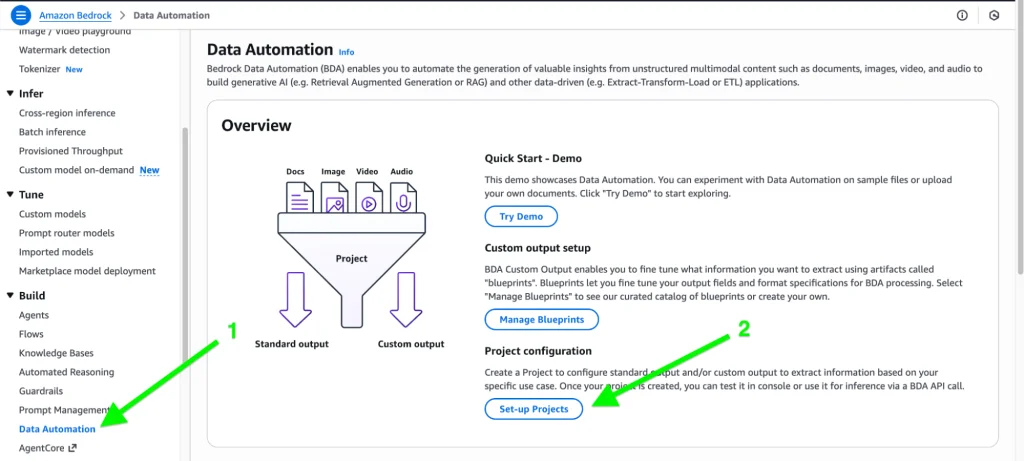
Enter the name of the project:
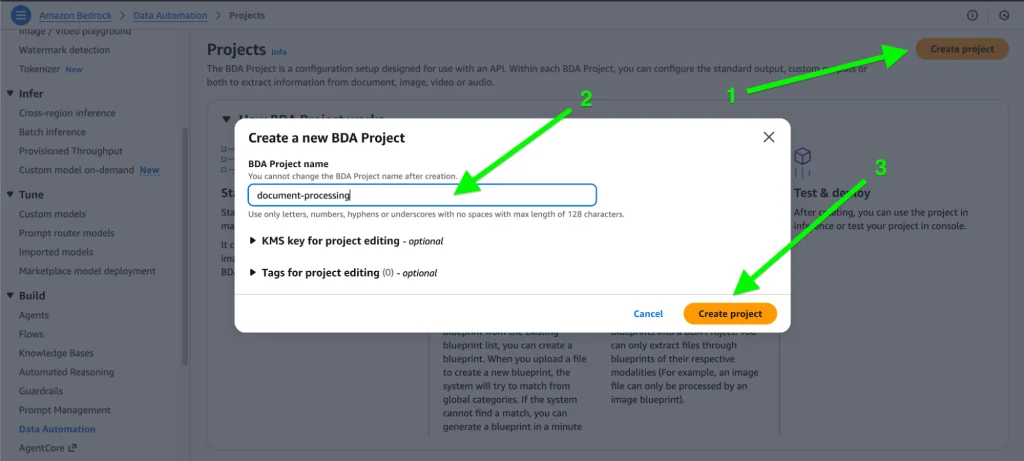
2. Standard output:
Standard output gives you the model’s default, unstructured response (text, image, audio, or video) directly from the Data Automation pipeline.
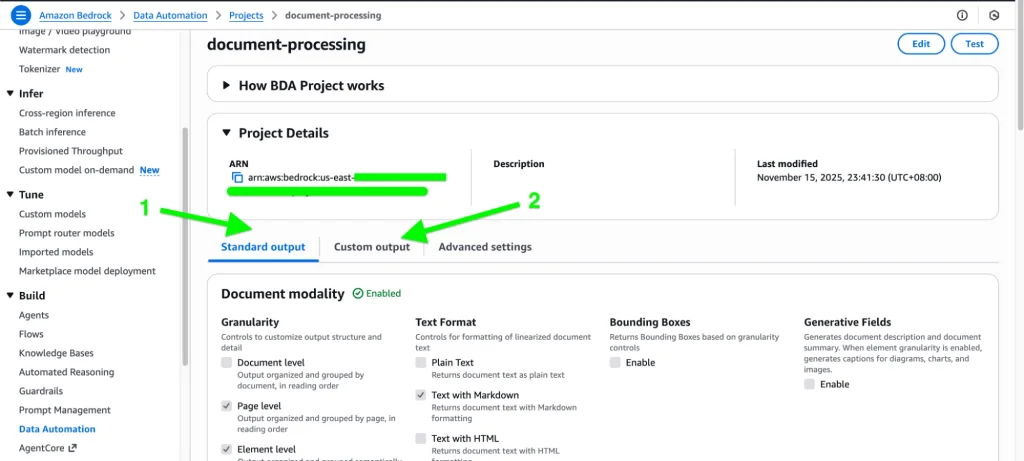
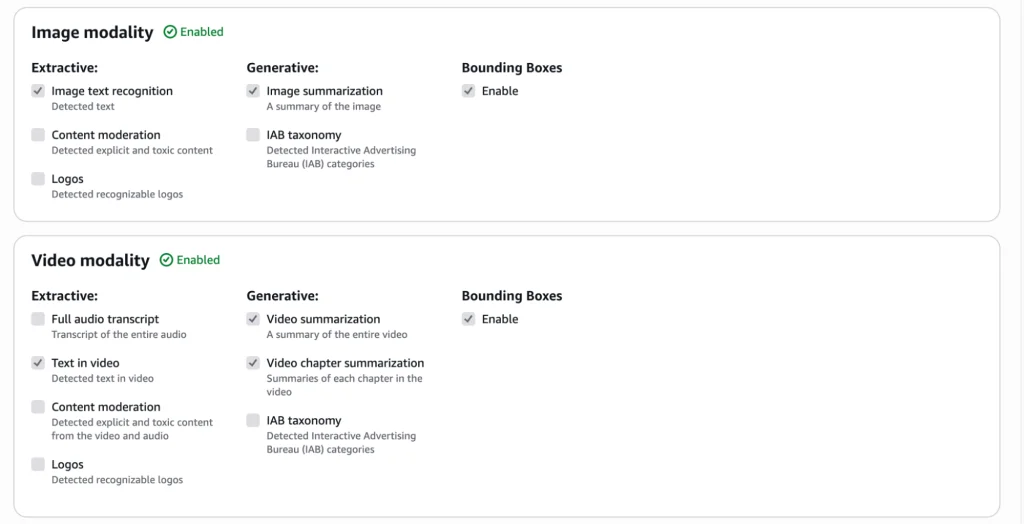
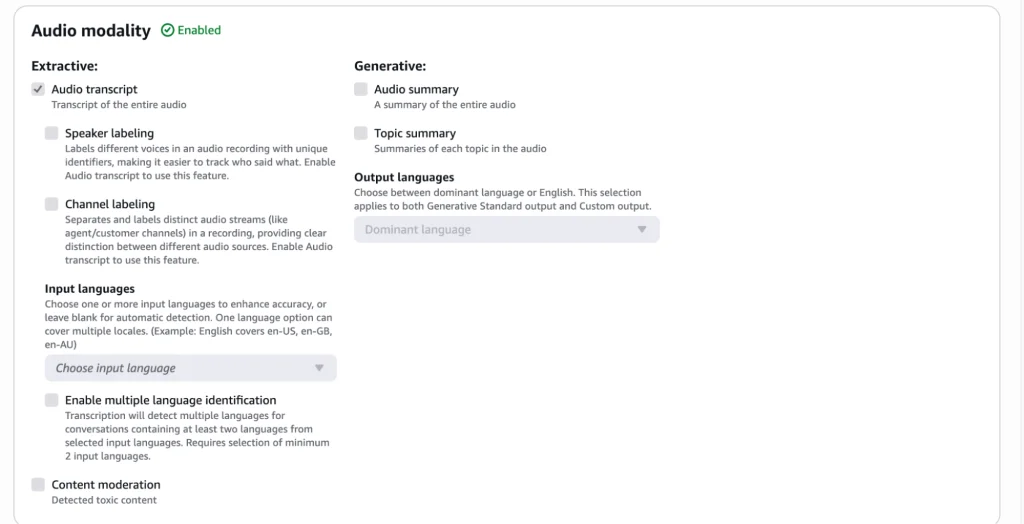
In standard output, each modality has its own options for what is needed as an output.
Document:
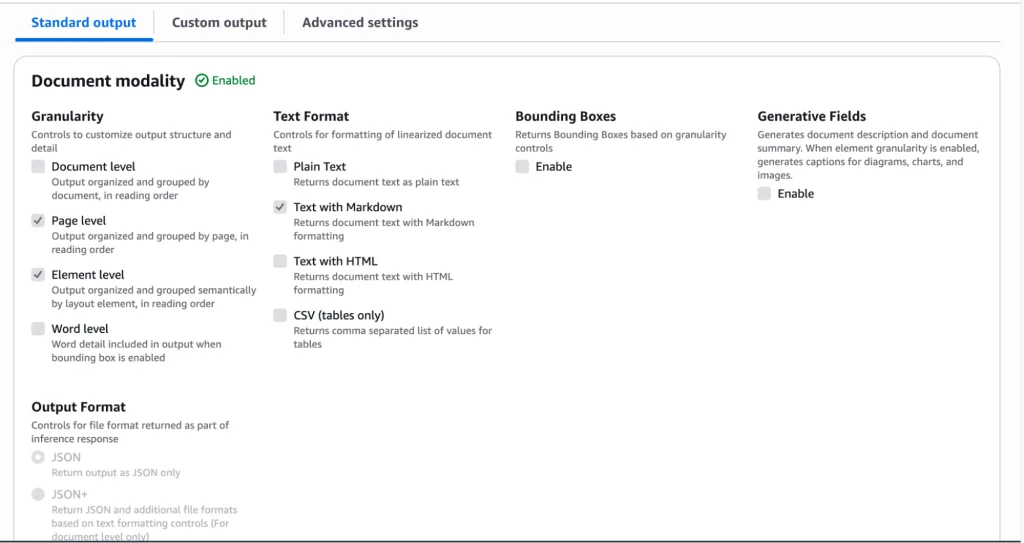
Image & Video:
Audio:
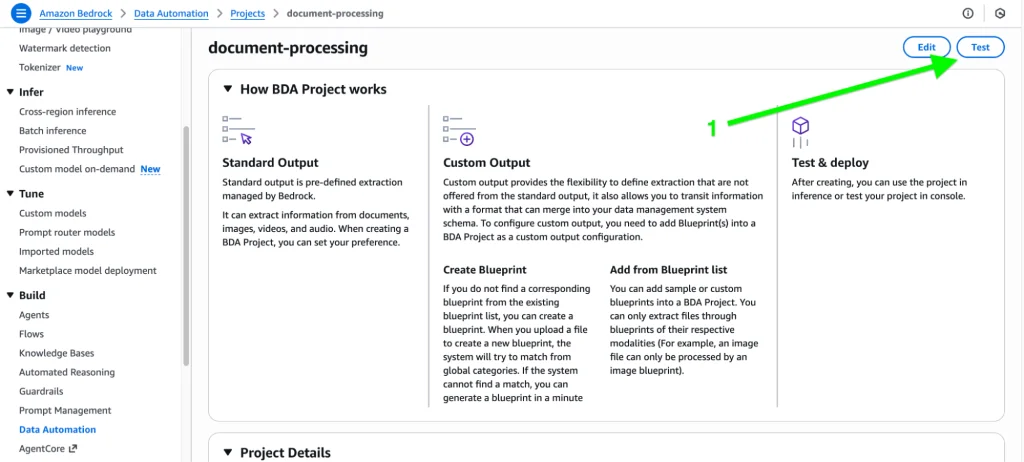
Now let’s test Document Modality for Standard Output:
First, click on “Test” in the upper right corner.
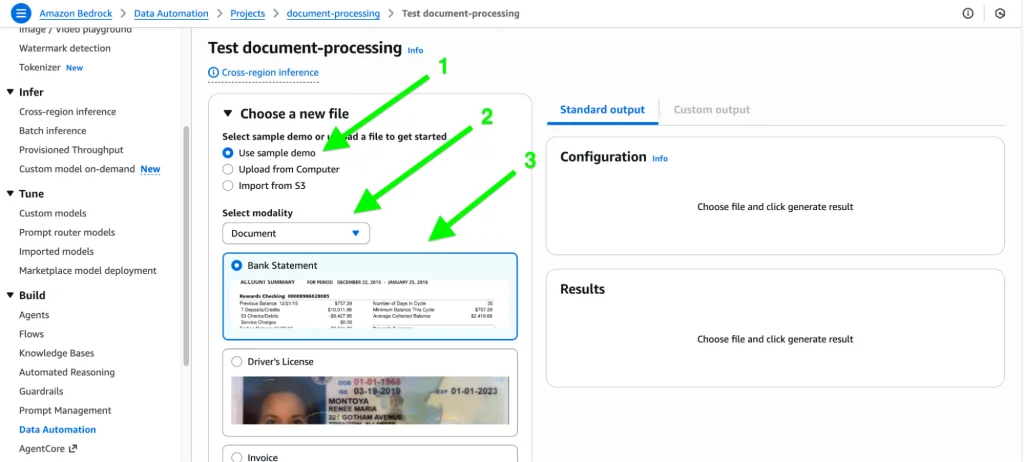
Next, select the document from the system, sample, or S3 and choose the modality from the dropdown menu.
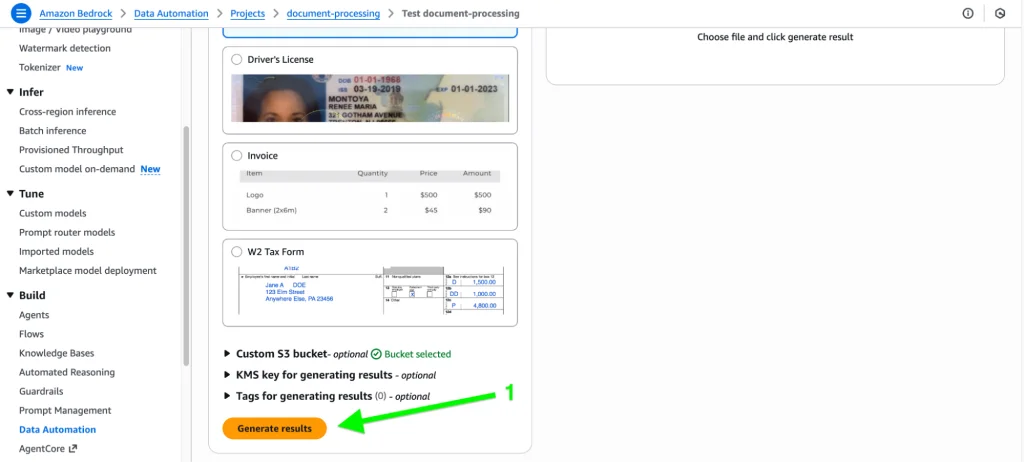
Click on the “Generate results” button:
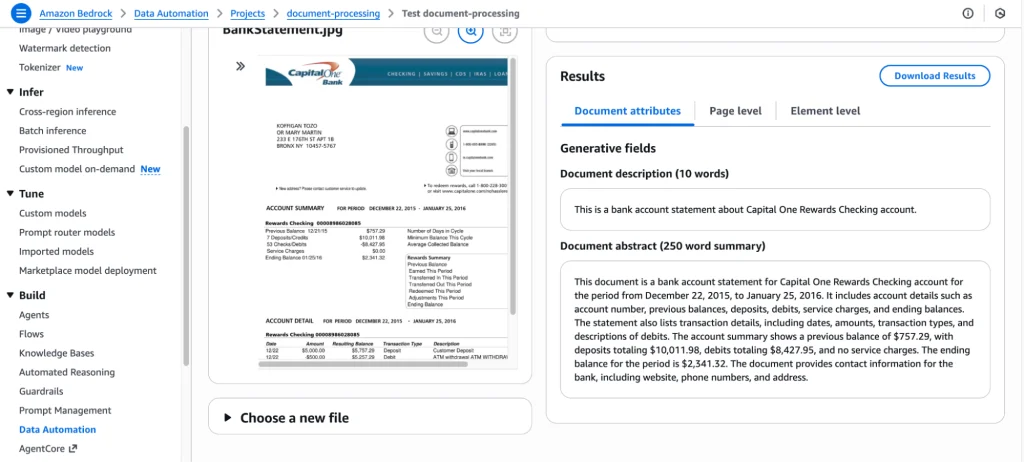
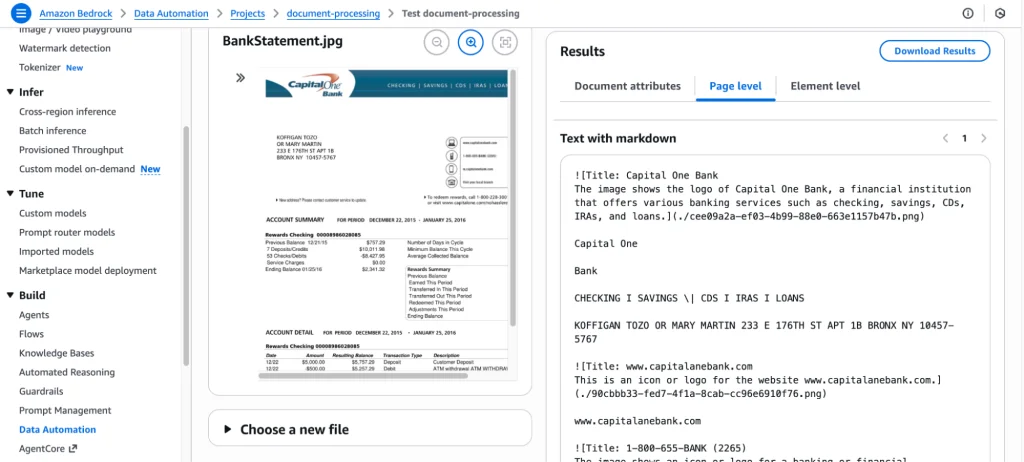
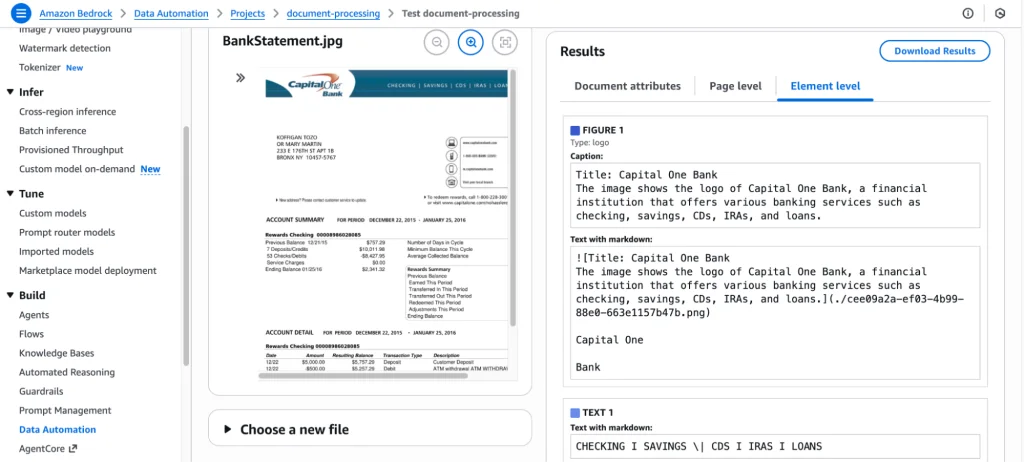
After processing, it will show the summary and content of the document:
Custom output (blueprints):
Custom output lets you define a structured, predictable format using blueprints, which ensures the output matches your exact schema, fields, and business rules.
Let’s test custom output using blueprints for the same document:
Navigate to “Custom output” and click on “Add Blueprint”:
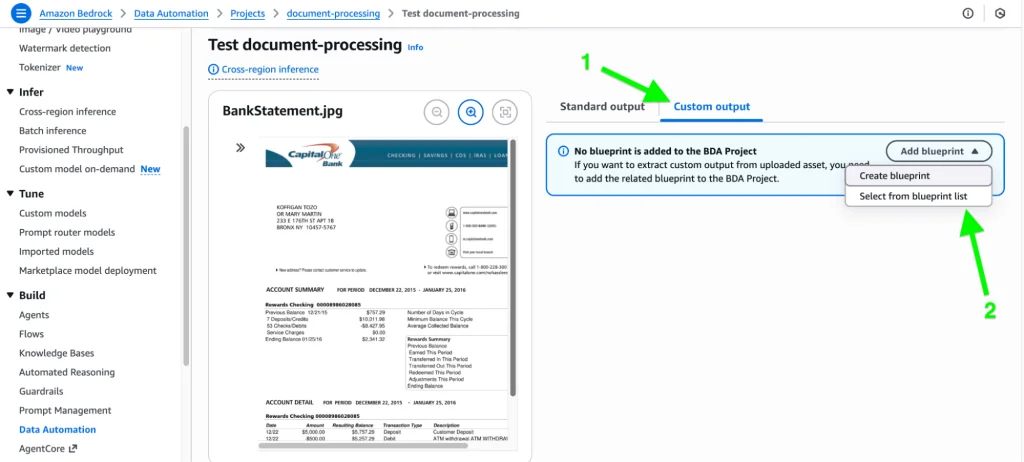
From here, two options will appear. You can either use LLM power to generate the blueprint (where it inspects the document), or you can choose to enter field names, instructions, and other information manually.
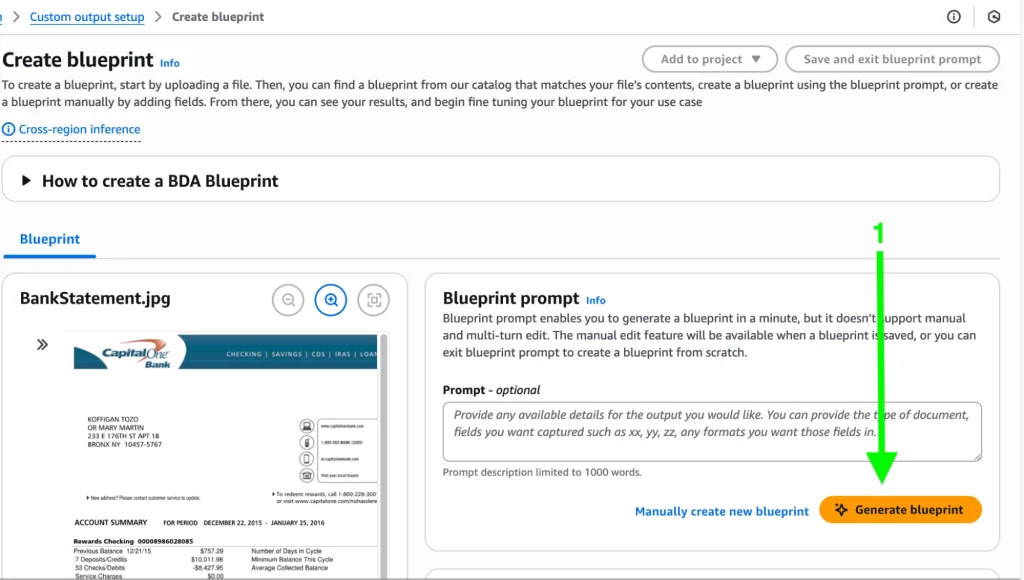
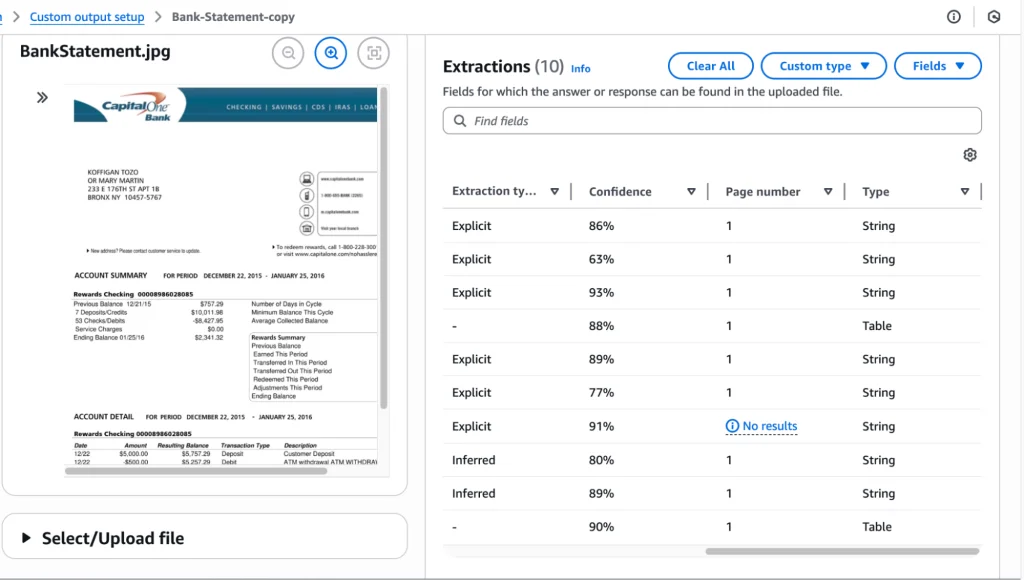
Below is a blueprint generated by LLM which has pulled all possible fields and tables from the document:
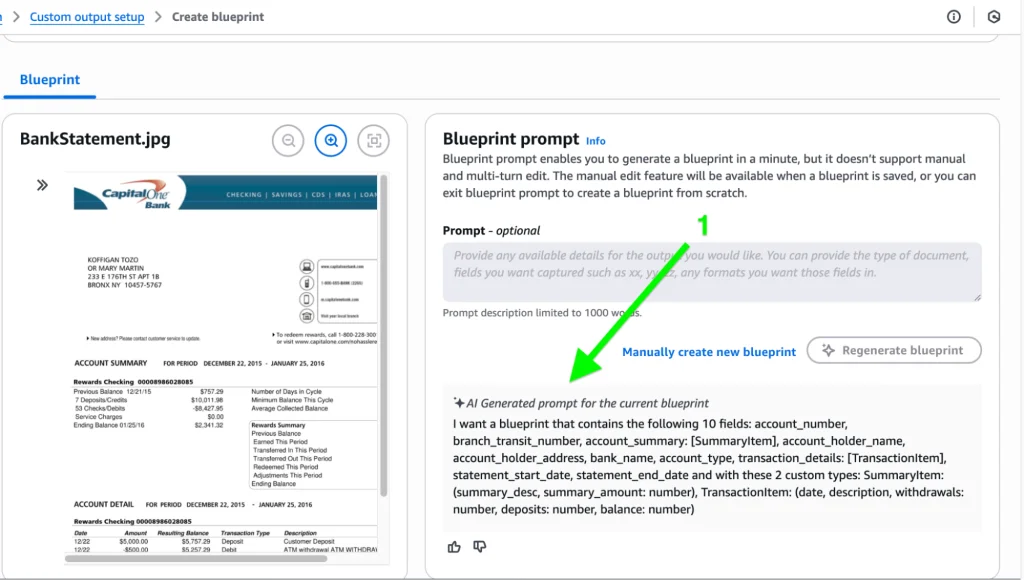
It has extracted the information using the blueprint as demonstrated below, including the Field name, Instruction, and Results:
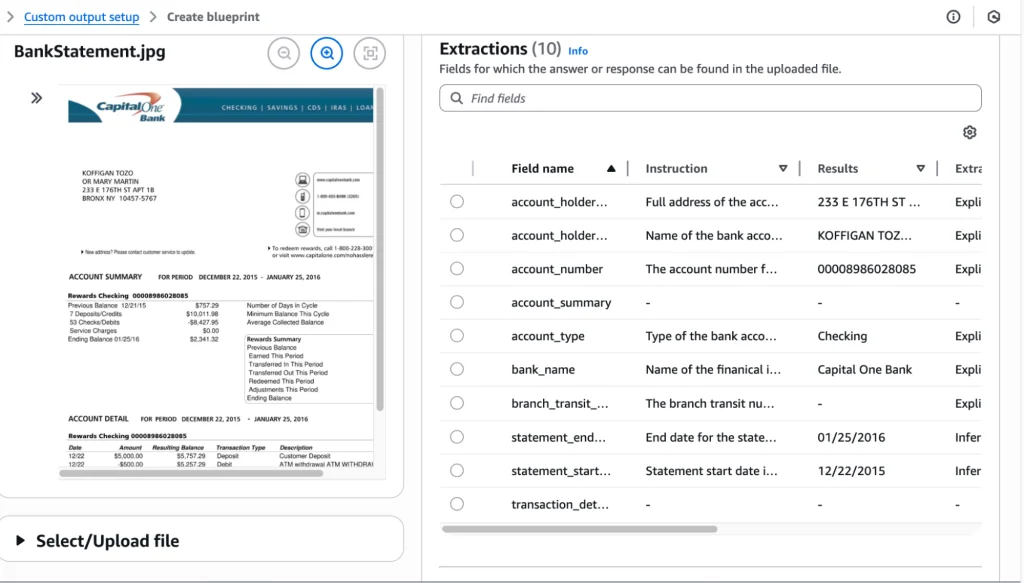
It also provides the Extraction type (which can be Explicit or Inferred), Confidence percentage, and other relevant information.
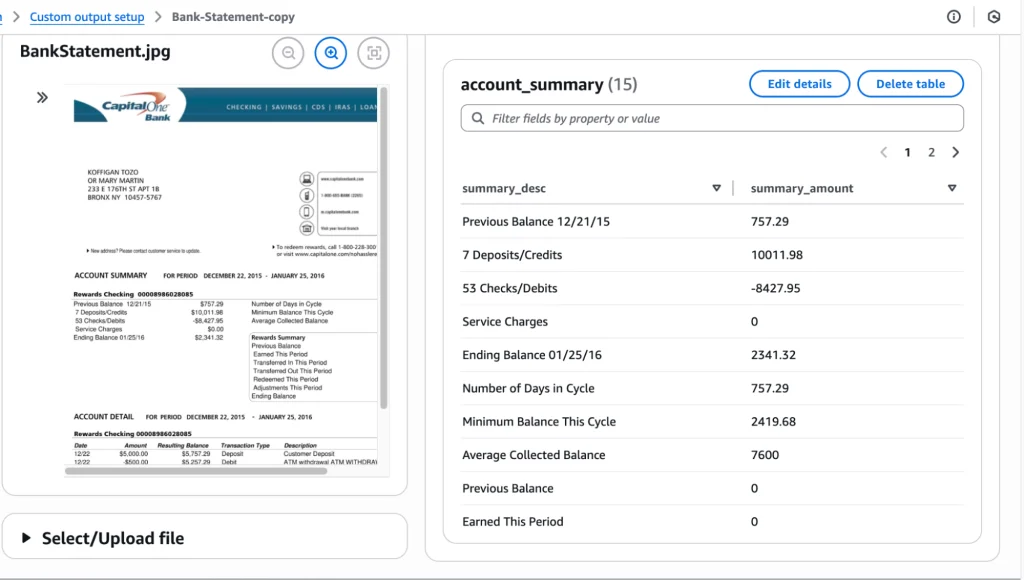
Additionally, it can extract information in the form of a table, such as an account summary or transaction information:
Code examples
Amazon Bedrock Data Automation (BDA) Utility Module
Description:
Helper functions to create BDA projects, blueprints, invoke jobs,
monitor job status, and fetch results.
import boto3
import time
import json
import botocore
class BedrockDataAutomation:
def __init__(self, region="us-east-1"):
self.bda = boto3.client("bedrock-data-automation", region_name=region)
self.runtime = boto3.client("bedrock-data-automation-runtime", region_name=region)
# ------------------------------------------------------------
# BLUEPRINT OPERATIONS
# ------------------------------------------------------------
def create_blueprint(self, name, schema, description="", stage="LIVE"):
"""
Create a BDA Custom Output Blueprint from a JSON schema.
"""
print(f"Creating blueprint: {name}")
response = self.bda.create_blueprint(
blueprintName=name,
blueprintStage=stage,
type="DOCUMENT",
schema=json.dumps(schema)
)
return response["blueprint"]["blueprintArn"]
# ------------------------------------------------------------
# PROJECT OPERATIONS
# ------------------------------------------------------------
def create_project(self, name, description, standard_output_config, custom_output_config=None):
"""
Create a BDA Project with Standard or Custom Output.
"""
print(f"Creating project: {name}")
response = self.bda.create_data_automation_project(
projectName=name,
projectDescription=description,
projectStage="LIVE",
standardOutputConfiguration=standard_output_config,
customOutputConfiguration=custom_output_config or {}
)
return response["projectArn"]
# ------------------------------------------------------------
# INVOCATION OPERATIONS
# ------------------------------------------------------------
def invoke_project(self, project_arn, profile_arn, input_s3_uri, output_s3_uri, blueprints=None):
"""
Invoke a BDA project using async invocation.
"""
print(f"Invoking project: {project_arn}")
kwargs = {
"inputConfiguration": {"s3Uri": input_s3_uri},
"outputConfiguration": {"s3Uri": output_s3_uri},
"dataAutomationConfiguration": {
"dataAutomationProjectArn": project_arn,
"stage": "DEVELOPMENT"
},
"dataAutomationProfileArn": profile_arn
}
if blueprints:
kwargs["blueprints"] = blueprints
response = self.runtime.invoke_data_automation_async(**kwargs)
invocation_arn = response["invocationArn"]
print("Invocation ARN:", invocation_arn)
return invocation_arn
# ------------------------------------------------------------
# JOB STATUS POLLING
# ------------------------------------------------------------
def wait_for_job(self, invocation_arn, poll_interval=10):
"""
Poll until job finishes.
Returns final status object.
"""
print("Polling job:", invocation_arn)
while True:
try:
resp = self.runtime.get_data_automation_status(
invocationArn=invocation_arn
)
except Exception as e:
print("Error fetching status:", e)
raise
status = resp["status"]
print(f"Status: {status}")
if status in ("SUCCEEDED", "FAILED", "CANCELLED"):
return resp
time.sleep(poll_interval)
# --------------------------------------------------------------------
# EXAMPLE USAGE
# --------------------------------------------------------------------
if __name__ == "__main__":
bda = BedrockDataAutomation(region="us-east-1")
# 1. Create Blueprint
blueprint_schema = {
"type": "object",
"properties": {
"account_holder": {"type": "string"},
"balance": {"type": "string"},
"transactions": {
"type": "array",
"items": {
"type": "object",
"properties": {
"date": {"type": "string"},
"description": {"type": "string"},
"amount": {"type": "string"}
}
}
}
},
"required": ["account_holder", "transactions"]
}
blueprint_arn = bda.create_blueprint(
name="BankStatementBlueprint",
schema=blueprint_schema,
description="Extract fields from bank statements."
)
# 2. Create Standard Output Config
standard_config = {
"document": {
"extraction": {
"granularity": {"types": ["PAGE", "LINE"]},
"boundingBox": {"state": "ENABLED"}
},
"outputFormat": {
"textFormat": {"types": ["PLAIN_TEXT", "CSV"]}
}
}
}
# 3. Create Project with Custom Blueprint
project_arn = bda.create_project(
name="BankStatementProject",
description="Process PDF bank statements",
standard_output_config=standard_config,
custom_output_config={
"blueprints": [
{
"blueprintArn": blueprint_arn,
"blueprintStage": "DEVELOPMENT",
"blueprintVersion": "1"
}
]
}
)
# 4. Invoke the project
# Ensure you replace <ACCOUNT_ID> with your actual AWS Account ID
profile_arn = "arn:aws:bedrock:us-east-1:<ACCOUNT_ID>:data-automation-profile/us.data-automation-v1"
invocation_arn = bda.invoke_project(
project_arn=project_arn,
profile_arn=profile_arn,
input_s3_uri="s3://your-bucket/input/statement.pdf",
output_s3_uri="s3://your-bucket/output/",
blueprints=[
{
"blueprintArn": blueprint_arn,
"version": "1",
"stage": "DEVELOPMENT"
}
]
)
# 5. Poll job status
final_status = bda.wait_for_job(invocation_arn)
print("Final status:", json.dumps(final_status, indent=4))
Types of document blueprints
When processing documents, BDA supports five core automation types:
1. Classification: invoice, bank statement, ID card, contract, HR letter, etc.
2. Extraction: Extract entities, fields, tables, metadata.
- Example: From a bank statement → Date, Description, Amount, Balance.
3. Transformation: Modify or restructure data.
- Example: Convert Home Address into separate fields -> street, city, ZIP code, etc.
4. Normalization: Standardize data values.
- Example: Convert multiple date formats (MM/DD/YYYY → YYYY-MM-DD).
5. Validation: Validate extracted fields against rules.
- Example: Amount must be numeric; dates must match the format; balances must reconcile.
Use cases that illustrate business value
Real-world scenarios where BDA provides significant ROI include:
- Financial Services: Automate processing of bank statements, invoices, and loan applications, reducing manual labor and speeding up reconciliation or underwriting.
- Insurance: Ingest and extract data from claims forms, medical reports, and damaged-asset photos.
- HR / Legal: Process resumes, contracts, and offer letters; extract structured data, including skills, clauses, salaries, and parties.
- Customer Support: Transcribe and summarize calls, extract intent and sentiment, and feed those insights into CRM or case systems.
- Security & Compliance: Analyze CCTV footage or meeting recordings to detect key actions, summarize context, and flag compliance issues.
BDA proves itself flexible and powerful, as it supports both standard outputs for basic workflows and fine-tuned custom schemas via blueprints. It is scalable and robust, with projects that enable batch processing and versions (development vs. live) for safe testing. It’s also audit-friendly, providing structured fields with types, normalization rules, and validation logic.
“Compared with rule-based systems, foundation models achieve better semantic extraction across the board.”
A true key benefit is that BDA is multimodal across formats. Users can use the BDA framework to process documents, images, audio, and video. And, best of all, it’s highly accurate. Compared with rule-based systems, foundation models achieve better semantic extraction across the board.
Amazon Bedrock Data Automation empowers businesses to transform unstructured, multimodal content into structured, trustworthy, and actionable data. With minimal setup, highly customizable blueprints, and a scalable project-based architecture, BDA helps organizations reduce manual workload and unlock insights faster.
The post Template-based data extraction is dead. Here’s what comes next. appeared first on The New Stack.